

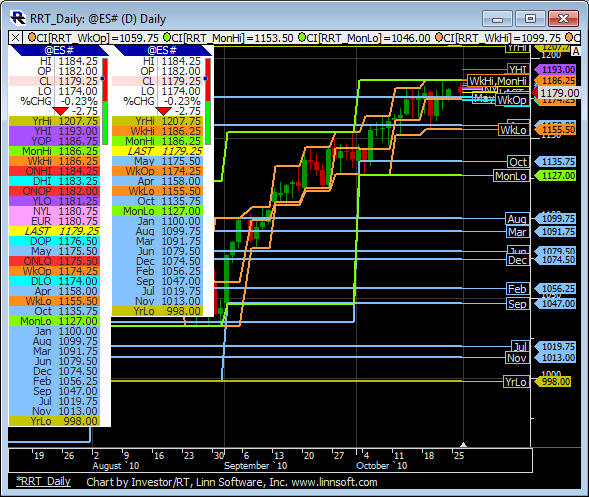
The Railroad Tracks QuoteBoard (RRT QB) was created in response to a request from a user in order to plot many time- and date-sensitive prices that are also plotted by a Railroad Tracks indicator provided by DTI. The RRT QB plots the following short term and long term values.
- Short Term
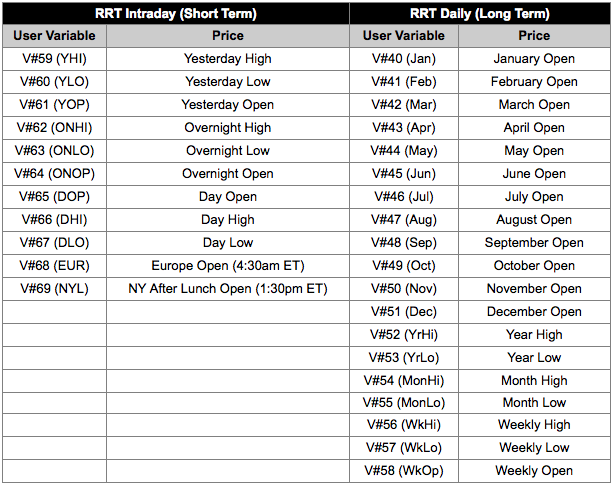
- Yesterday's Day Session High, Low, and Open. Overnight High, Low, and Open. Day Session High, Low, and Open. Europe Open. NY After Lunch Open.
- Long Term
- Open of All Twelve Months. Year High and Low. Month High and Low. Weekly High, Low, and Open.
More details on these values can be found in the table at the bottom of this page, as well as a few additional notes. Watch the Railroad Tracks QuoteBoard setup video below to learn how to quickly bring the RRT QB into your system. The setup video requires minimal technical knowledge. If you are interested in more technical details relating to the creation and configuration of the RRT QB, watch the Technical Details video.
- Railroad Tracks QuoteBoard Setup Video (13 mins) - This vides explains how to quickly and easily pull the RRT QB into your Investor/RT system. It is highly recommended that users watch this video before using the RRT QB.
- Technical Details Video (32 mins) - This video provides more extensive details on how the Railroad Tracks QuoteBoard was setup including the creation of the custom indicators and the configuration of the user variables. It is NOT required that you watch or understand this video in order to make effective use of the Railroad Tracks QuoteBoard.
- RRT All - Use this file for both the Short Term (Day, Overnight, and Prev Day) and Long Term (Weekly, Monthly, Yearly) values.
- RRT Intraday (Short Term) - Import this definition for only Short Term (Day, Overnight, and Prev Day) values.
- RRT Daily (Long Term) - Import this definition for only Long Term (Weekly, Monthly, Yearly) values.

Additional Notes on Railroad Tracks QuoteBoard
- The RRT_Intraday chart must be kept open in order for the short term prices to continue to update dynamically. The RRT_Daily chart must be kept open in order for the long term prices to update dynamically. They will still work fine if they are minimized but they must be kept open in order to keep updating those values.
- Uses User Variables V#40 thru V#69. For users that want to learn more about User Variables, watch this 16-minute User Variable Video
- For users who would like to learn more about the QuoteBoard Indicator including how to setup your own QuoteBoard indicator with custom prices, visit the QuoteBoard Indicator Page.