

When the text "NOT MARKED INTRADAY" is printed in the title of an intraday chart, it means that the symbol charted is not marked for intraday monitoring.
What does it mean to mark a symbol for intraday monitoring?
When a symbol is marked for intraday monitoring, Investor/RT will ALWAYS monitor that symbol tick by tick, and retain the collected data (along with any other downloaded intraday data) as you are connected to your main source of live data (IQ Feed, Rithmic account, etc).
- Advantages: Investor/RT will retain that historical data, and append the new data as it flows in, even if you have currently no chart open displaying that symbol or a Quotepage open and monitoring that symbol and as long as you remain connected to your main source of live data (IQ Feed, Rithmic account, etc). Therefore, no data downloads should be necessary the next time you open an intraday chart with that symbol (or a QP listing this symbol) during that same trading session.
- Disadvantage: Every symbol that is marked for intraday monitoring always contributes towards the "symbol limit" provided by the data service (if you are subject to such a limitation). You can open the ".Intraday" system quotepage to get a quick and complete view of the symbols that are marked for intraday.
Key recommendation: It is always wise to turn off Intraday monitoring if you know in advance that you won't use the corresponding data during your trading sessions. This is especially true for heavily traded futures instruments and during peak market times, as this may substantially ease your computer CPU use. For the record, I/RT default setting is to monitor intraday data for any new instrument you add in your instance (this behaviour can be modified in the File > Preference > Instrument > Instrument default menu)
How is a symbol marked/unmarked for Intraday Monitoring?
- To turn on/off intraday monitoring for a specific symbol, right-click on the ticker symbol in any quotepage and choose "Setup" from the popup menu. In the resulting "Instrument Setup" window, check the "Monitor Intraday" checkbox and then click the "Modify" button.
- To turn on/off intraday monitoring for all symbols in a quotepage at once, click the bottom left button on the quotepage toolbar
 . After clicking on the button, you should be prompted whether to "Mark" or "Unmark" all the symbols in that quotepage.
 - The MON token can be used to turn on/off the intraday monitoring through the following following SCAN statements: SET(MON, MON_INTRA) to turn on // SET(MON, -MON_INTRA) to turn off the monitoring
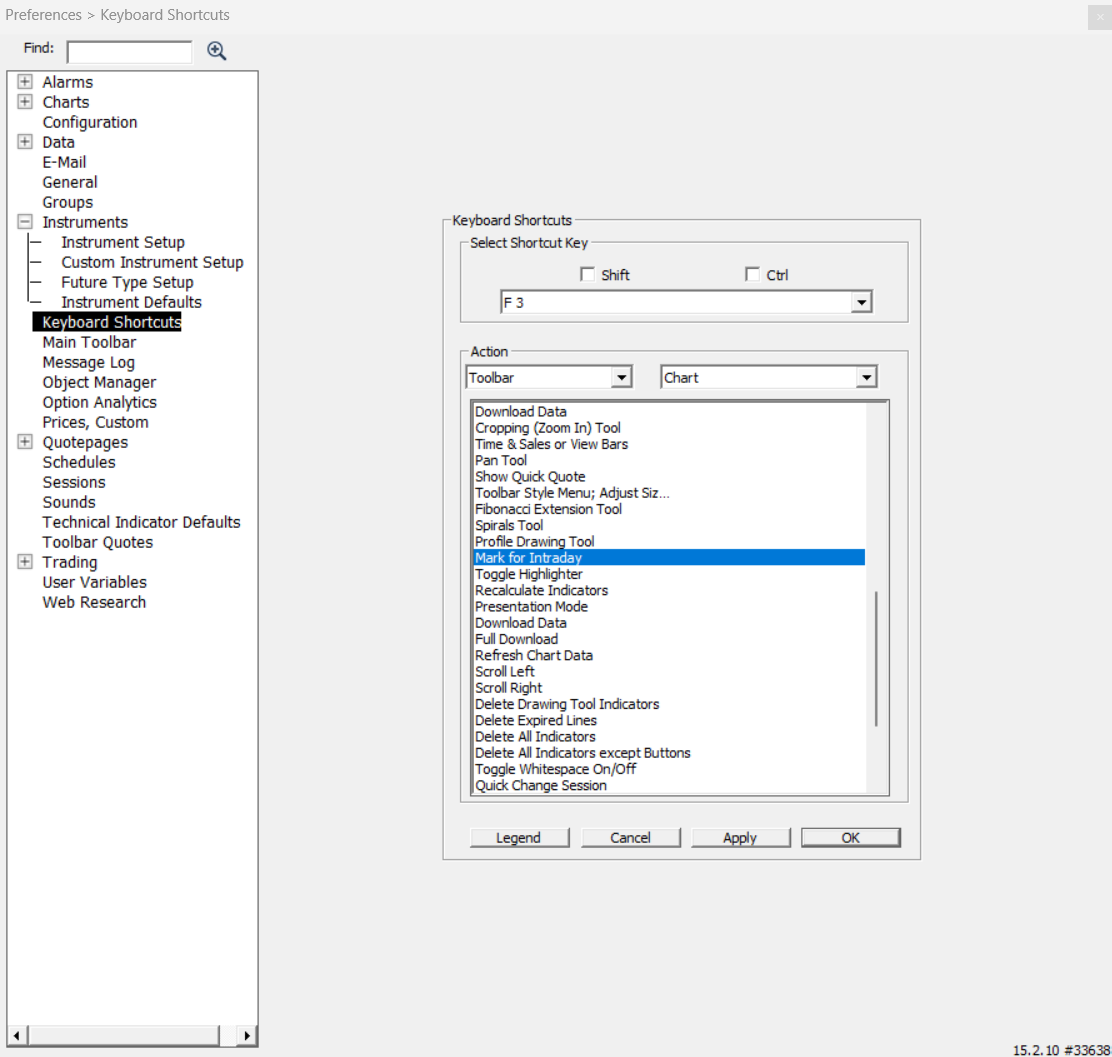
- A keyboard shortcut is available in the Setup: Preferences: Keyboard Shortcut window. The selection "Mark for Intraday" is located at the end of the list of Toolbar / Chart actions (as seen in image below). The effect of this shortcut is to mark any instrument(s) in the front chart window for intraday monitoring. For example, if you setup F3 as "Mark for Intraday" and you open an intraday chart of IBM and see a warning in the chart window title saying "NOT MARKED INTRADAY!", you can then press F2 to mark IBM for intraday monitoring. The warning in the chart window title will disappear. (Since Chart Buttons can invoke keyboard shortcuts also, you may use this new feature to create a "Mark Intraday" button in chart windows if desired)
Note: After marking a symbol for intraday monitoring, you may notice that the "NOT MARKED INTRADAY" message is not removed immediate to properly reflect the new state of your symbol. If you save the chart, or close and reopen the chart, the message should go away.