

Home                           

 Try Investor/RT             

 Investor/RT Tour           

 Getting Started              

 What's New                  

 Testimonials                 


MASTER INDEX
  SEARCH
  CHARTS
  MAIN TOOLBAR
  SETTING PREFERENCES
  TECHNICAL INDICATORS
 
WHAT'S NEW
  ALARMS
  BACKTESTING

  CONFIRMING TRADES
  CUSTOM COLUMNS
  CUSTOM INDICATORS
  CUSTOM INSTRUMENTS
  CUSTOM PRICES
  DATA FEEDS
  DATABASE
  DOWNLOADING DATA
  FEED STATUS
  HEARTBEAT
  HELP
  MULTI-LINKING
  MULTI-PERIODICITY
 
INSTRUMENT SETUP
 
NASDAQ LEVEL II
 
NEWS TICKER
 
NEWS BROWSER
  OPTIMIZATION
  OPTIONS ANALYTICS

  PLACING TRADES
  PORTFOLIOS
  PRESETS
 
PRINTING
  QUICK QUOTES
  QUOTE PAGES
  REALIZATION
  RTL LANGUAGE
  SCANS
  SCHEDULES

  SCOPE
  SYSTEM STATUS
  TICKER TAPE
  TIME AND SALES

 
TRADING NOTES
  USER VARIABLES
  VERTICAL SCALE
MASTER INDEX
DICTIONARY
FEEDBACK

Investor/RT Tour
Bar Charts

A bar shows a vertical line representing the high to low trading range for the bar. Tick marks on the left and right side of the vertical bar mark the open and closing price of the bar. Daily, weekly, and monthly bars are color coded with an up color or down color based on whether the closing price of the bar is higher or lower than the closing price of the prior bar.
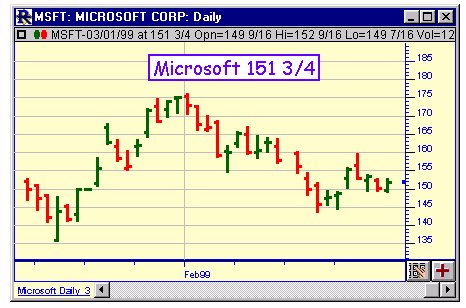
Bar Charts

The default colors used are specified in Chart General Preferences. Intra-day minute bars may be color coded based on either the closing price of the previous bar or on the opening price of the bar. When viewing a tick by tick chart, if bar format is chosen, the trading range of the bar is drawn to depict the bid-ask range (instead of high low range). The trading price of each tick is then depicted as a mark through the trading range. The is a convenient way to watch how an instrument is trading relative to its current bid/ask.