

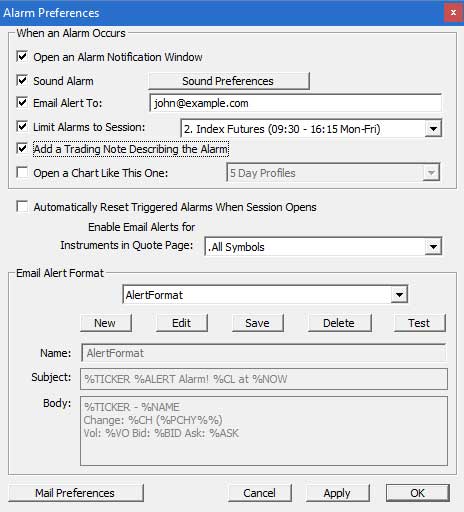
There is a new Preferences window entitle Alarm Preferences which can be accessed by choosing "Alarms" from the Setup Prefs list, or by clicking on the Advanced button in the Alarms window, as seen above. The Alarm Preferences window is seen above.
In the top part of the window, you can create, edit, and delete formats which will be for the subject and body of the email alerts. These custom messages can be composed of any text and data tokens. Data tokens are composed of any primitive or historical RTL token prefixed with a %. For instance, if you want the ticker symbol in your message, you would use %TICKER. If you would like the volume, %VO, etc. If you want an actual "%" to show up as text in the line, use "%%".
In the window above, the subject has the format "%TICKER @ %CL %PCHY%% %VO". If an hi alarm triggered on MSFT, you might see the alarm subject of "MSFT @ 70 13/16 +2/06% 4,008,700".
If you would like your alerts to be sent to an email address or group of email addresses, first check the "Email Alerts" checkbox. To the right, select the quotepage. This quotepage will specify which group of symbols you would like to have alerts emailed for. If you would like all your alerts emailed, then choose the ".All Symbols" quotepage from the list. Finally, specify an email address, or list of email addresses, in the "Email Address" field. If you specify multiple addresses, be sure to separate them with a comma.
Chat Alerts If you would like for your alerts to be sent into a chat room, check the "Send Alert to Chat Room" checkbox, and specify the chat room from the list to the right. The message sent to the chat room will follow the "Subject" format of the Email Format. Again, alerts will only be sent on symbols in the quotepage chosen.
A word of caution on chat alerts. You must be careful when sending your alerts to a chat room, especially if you are sending them to a crowded chat room. If one of your symbols really starts moving, and the chat room starts getting flooded with your alerts, you could annoy other participants of the chat.