

Stock Alarms
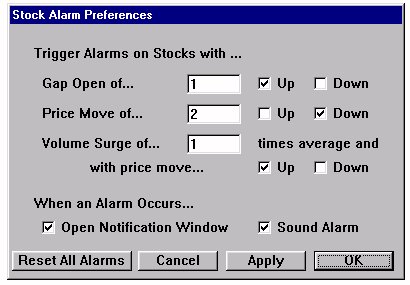
Investor/RT includes several alarms to alert the user to specific market activity. Each alarm can alert the user to positive or negative market activity by checking Up or Down for the designated alarm. Gap Open is the difference between closing price and opening price on the following trading day. Type in a dollar amount of the Gap for which you want an alert and check Up and/or Down. Price Move measures a sudden price change. Type in a dollar amount of the movement for which you want an alert and check Up and/or Down. Volume Surge is measured in multiples of average volume movement. For example, to set an alarm for a 30% surge in volume, put a 1.3 in the box, indicating volume 130% higher than normal. Check Up and/or Down to indicate whether you want notification of volume surges when prices move up or down.
When an Alarm Occurs...
You can choose to be notified audibly by checking the Sound Alarm box. You will receive visual notification by checking Open a Notification Window. If Investor/RT is minimized or hidden and an alarm triggers while "Open a Notification Window" is checked, the alarm window will still display. Once an Alarm triggers, it must be reset before it will trigger again. Click the Reset All Alarms button to reset the system.