

See Also: Custom Prices
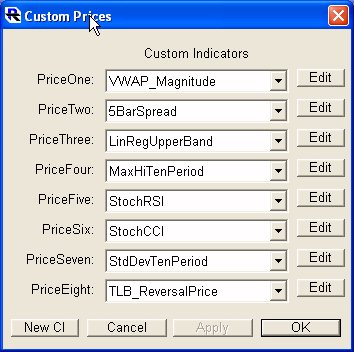
Custom Prices
A powerful new feature is available in Investor/RT that allows the user to access Custom Indicator values anywhere that the "Price Type" options are available.
Throughout Investor/RT, you will find places where a list of prices are presented. These prices include market data prices such as Close, High, Low, Open, and computed prices values such as Hi+Lo/2 or Op + Hi + Lo + Cl/4, etc. These price lists are found in many technical indicator setup windows, in the instrument setup window, in Point and Figure, Three Line Break, and Volume Profile Chart preferences, and many other places. Anywhere you see a price option, there will be eight new custom prices at the end of the price type list. Each of the custom price types in the list can be assigned to any Custom Indicator you have created. A new preferences window is available (see: Setup Preferences: Prices, Custom). This window allows you to assign each Custom Price to a Custom Indicator (PriceOne through PriceEight). In price list menus, you will see menu items of the form "P1:CI_Name" where "CI_Name" is the name of the Custom Indicator. These Custom Prices will open up new possibilities for existing technical indicators (such as SSTAT, SSIM), and will enhance the charting capabilities of Investor/RT in many way (e.g. Point & Figure, Three-Line Break, Volume Profile).
The Custom Price window can also be accessed directly from the Custom Indicator window by choosing "Send To: Custom Prices".
Using Custom Prices in Custom Instruments
When setting up a custom instrument, each component of the custom instrument references a "Value" of some instrument. Supported values include: last, bid, ask, high, low, and other more specialized values. The Value used can also be a particular V# user variable value of the component instrument. However, when V# values are referenced by a custom instrument, the V# values must be independently set, by a periodically run scan for example.
In Investor/RT Version 6, the notion of "Value" has been extended more generally to include custom indicator formulas expressed in the RTL language. The formula must be formed by references to instrument properties or the current OHLC prices. No references to historical value, e.g. CL.1, or technical indicators is supported.
This is accomplished using one of the "Custom Prices", P1 through P8 as the Value choice when setting up a custom instrument. Each custom price P1 – P8 is associated with a custom indicator which provides the formula for computing the custom price (value). For example, a simple custom indicator such as:
(CL + CL + HI + LO)/4 ; (close weighted average price)
might be used as the custom price value when computing the sum, difference, or ratio between two instruments. First create the custom indicator and save it. Then go to Setup: Preferences: Prices-Custom and setup one of the eight custom prices with the name of this custom indicator. Then use that Pn custom price as the value choice when defining the components of any custom instrument.
Only current properties and the current values of OP, HI, LO, CL, and VO can be used in the formula. References to current prices of specific instruments can be included, e.g.
(CL(IBM)/CL(MSFT) * CL); (a dynamic ratio multiplier)
is a custom price value that computes the current ratio of the current price of IBM and MSFT and uses that ratio as a multiplier times the current price of the component instrument.