

Submitted by linnsoft on Tue, 04/23/2013 - 20:47
See Also: Day Bar Charts
This is the window for specifying the default preferences for Day Bar Charts.
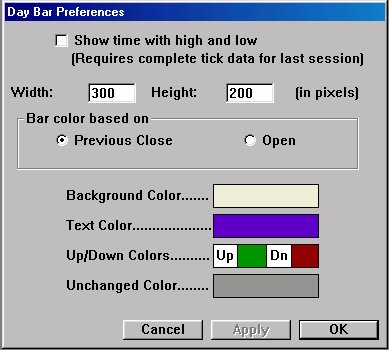
- Draw as Candlestick - (New in 4.9: Not shown above) Represents prices in a candlestick form as opposed to a bar form.
- Show time with high and low - This options will give you the last time during the last session that the high and lows were realized. In order for this option to work reliably, you must have a complete set of tick data for the current, or most recent, session. If you do not have complete tick data, it is likely that your day bar chart will not be accurate. If this options left unchecked, the chart will simply draw the open, high, low, and last data from the quote page, and update it with each new tick.
- Width - Default Width for Day Bar Charts, in pixels.
- Height - Default Height for Day Bar Charts, in pixels.
- Bar color based on . . . - This allows you to specify the up/down bar color based on the last relative to either the previous close, or open.
- Background Color - Background color of chart.
- Text Color - Color of high, low, open, close, and time text.
- Up/Down Colors - Color used to represent up and down bars. The bar is considered up or down based on the criteria specified in the "Bar color based on . . ." preference discussed above.
- Unchanged Color - Color used to represent an unchanged bar. For instance, if you have specified "Bar color based on Open", and the Open and Closing price for the day are the same, then the bar will use the unchanged color.