

Introduction / Table of contents
DTN Market Access doesn t provide any realtime data: it is a historical data service, solely marketed by Linn Software. It is especially designed for Investor/RT subscribers relying on a brokerage feed as a primary real-time data source (for futures or stocks) and who are seeking access to high-quality historical data backfills
Part I discusses the datafeed configuration setups for these users:
- who are getting live quotes from their Rithmic, CQG or Interactive Brokers accounts
- but rely on the DTN MA historical data servers (the same ones that an IQ feed subscriber may access) for any data backfill requests.
Part II reviews the whole range of historical data that can be accessed with a DTN MA subscription, and the main benefits of accessing such data (vs a brokerage data provider).
The DTN MA historical data service can also be very beneficial to many other users profile, such as:
- any futures (or stock) daytraders willing to test new markets by using our playback and built-in trade simulator features to see how his favorite trade setups (based on cumulative delta analysis, order flow or footprint patterns, for example) would perform.
- any system developer willing to backtest his trading strategies on a very wide range of future or stock markets
- more generally, any end-of-day/swing traders interested in accessing our exhaustive technical indicators library, including our unique VWAP, TPO and volume profiling indicators (and possibly using our advanced scan features to screen 1000+ symbols and detect the best trade opportunities)
Part III reviews, for these users, how to install on their PC a second Investor/RT instance to be setup with DTN MA as sole data source (ie without any live streaming data reception capabilities)
Part I – Setting up a DTN MA subscription with a Live Rithmic / CQG or IBKR data source
Initial setup procedure (to be done once for all)
- First, verify that DTN MA is part of your subscription. If you just added it to your subscription, it will be automatically activated as per your next Investor/RT start-up. (It will show up as a “DTN-XXXX” when you check your license status through the File > License menu)
- Review the “Getting started - Initial datafeed setup” guide for your Rithmic, CQG or Interactive Brokers account. Make sure you have selected the second option (Broker/Prop firm) in the configuration datafeed menu, and not the first "Subscription source" option, which is reserved for the owner of an IQ feed live data subscription (or subscribers willing to run Investor/RT solely on DTN MA, i.e., without any live data source, as discussed on Part III)
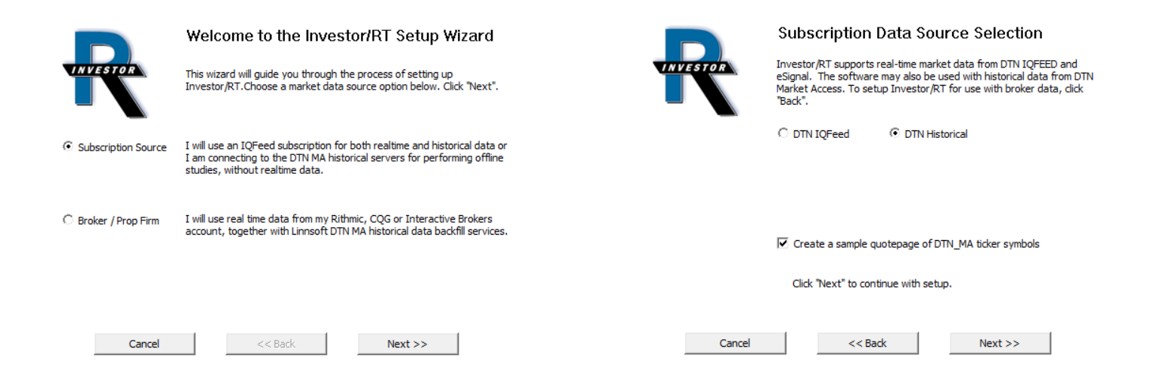
No other special actions or settings are needed to activate your DTN MA subscription, other than completing the datafeed setup wizard step for your specific live brokerage data source (and then restarting I/RT).
When the datafeed configuration is completed, I/RT automatically opens a QuotePage that lists popular US futures contracts (with symbols that match your brokerage data feed), and it starts automatically downloading historical (continuous) future data for all these front-month contracts, using the DTN MA historical data servers (this database initialisation might take a few minutes).
The following sections discuss in more detail how I/RT handles these historical backfills, in case you would like to deviate from the default settings.
How does the integration between DTN MA and your live data provider work?
The link between the broker's live data source and the DTN MA services is configured in the instrument setup window for the future symbol.
When the datafeed configuration step is complete, I/RT automatically opens a QuotePage that lists pre-defined front-month contracts (with symbols that match your brokerage data feed).
Let’s say you are trading the Dec 2025 S&P500 E-Mini contract, using Rithmic data from your prop firm account
On a quotepage, right-click on the ES Z5 symbol and select “Setup Instrument” to review its settings:
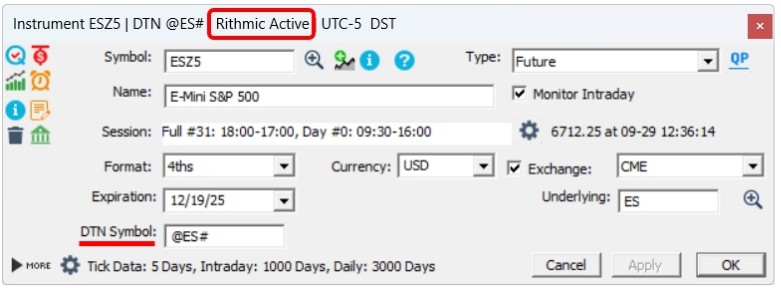
In this case, the “DTN Symbol" input box refers to @ES#, the DTN continuous future contract symbol to be used for any historical backfill requests.
A continuous future contract data series is a synthetic data series that stitches together the individual quotes of each successive front-month contracts to create a long and uninterrupted single price series (that can be back-adjusted to avoid any price gap linked to rollover operation). Here is a simple illustration: let's say we are on Oct. 15, 2025 and that you are opening a 30 min periodicity chart for ES Z5 chart, with a lookback period of 3 months. Practically speaking, the price being displayed for the past 30 days (ie from mid september 2025, i.e. since the day the ES Z5 contract became the front month contract) is actually corresponding to the trades associated with the Dec. 2025 contract. But for the 2 previous months, the price and volume being shown are in fact those of the Eeptember contract (ES U5), which was, for that 2-month period, the ES front-month contract, and whose price has been adjusted (by a fixed premium) so that the 2 data series have no gap (on the mlid sept. rollover day)
Please review this support page for additional information on this very important concept for futures data
How does historical data backfill work in practice?
First, you need to know that the vast majority of historical data download requests are automatically handled by I/RT. By default, whenever the application is launched, I/RT automatically connects to your data feed and performs any backfill request needed to fill up any missing data gap. (These default settings are the ones used by the vast majority of users)
For example, when you start up Investor/RT for the very first time of the day, I/RT will perform (automatically) a historical data download request (using the DTN MA server) to fill any data gap since your last connection. Such an incremental backfill might only takes few seconds (if you shut down I/RT once a day)
Please note that DTN MA is only used for historical data backfills, ie whenever you are connected to your Rithmic account, any live data is collected from the Rithmic live data stream.
Historical Database initialisation
Whenever you complete, for the first time, data feed configuration wizard sequence, Investor/RT will automatically perform a full data download to initialise its database with the entire historical data set that matches the retention settings for each symbol. Such an initial download operation may take a few minutes, depending on the amount of tick and 1-min data to be downloaded (you may want to check the message log to monitor the download). I/RT will also perform a full data download whenever you start monitoring a new instrument symbol for the first time. It is always recommended to perform such database initialisation or full data download operation outside of the US cash session market hours.
Important Notes :
- If you are not trading/monitoring the front-month future symbol, please refer to the main instrument setup support page to review how to proceed (by adjusting the DTN backfill symbol)
- If you are not sure about the futures symbol to use or what the current front-month contract is, please check our symbol guide pages or our rollover calendar webpage
- If you want to temporarily fully deactivate DTNMA (and rely on the sole Rithmic/CQG historical data server), this is possible by setting (in File > Preferences), the configuration variable UseDTNMAbyDefault to False
Part II: What are the benefits of a DTN MA subscription ?
II.1) What is included in your DTN MA subscription ?
For futures traders, using their Rithmic, CQG or IBKR account as live futures data source, a DTN MA subscription provides, in terms of historical data backfills:
- up to 20 years of 1 min data (and 180 days of tick data),
- continuous futures contract (i.e. with price data back-adjusted for rollover premium)
- the option to download “consolidated tape” data
- a very large coverage of US, European and worldwide exchanges
For stock traders, using their Interactive Brokers account as a live data feed source, DTN MA offers historical data backfills
- up to 20 years of 1 min data and 180 days of tick data
- for any of the 6000+ Nasdaq & NYSE securities (stocks & ETFs), but also for the Canadian and UK stock markets.
Please review the DTN symbol guide for an overview of all other information/data series available for download (offline) with a DTN MA subscription. Other than futures/Stock/ETF, it includes
- 100+ Cash indexes (and fair premium values) for all main US and EU equity markets
- Financial (Treasuries yield) and CBOE indexes (VIX for all main US equity indexes and stocks)
- 1000+ DTN Market internals (TICK, TRIN, etc for all main US equity indexes)
- Forex markets : 50 FXCM pairs & 1500+ Tenfore pairs
II.2) Reviewing, for a future trader, the main added value from DTN MA backfills
Let’s review each of the 4 benefits listed above
1) Increased historical data coverage (vs the data server managed by the brokerage source)
Reminder: Many of the most valuable Investor/RT features do require data sources providing precise historical and real time tick by tick information; this is the case for Bid/Ask powered indicators (such as the Volume Breakdown powering "Delta" type of analysis), Volume profile or Footprint indicators and for of all non-time related chart periodicities (such as renko or range bars, reversal tick charts, etc). Here is what you need to know about the limitation about live data source providers :
- Rithmic and CQG provide excellent tick-by-tick live futures data; However, their historical backfill coverage is very limited and doesn't include any continuous future contract data. Their data servers are not optimized for efficient historical data backfills, as their primary purpose is to ensure a stable connection to the exchange and very fast order routing and execution services. Rithmic also has a set limit on the amount of historical tick data you are entitled to download over a 7-day period. (It is impossible to monitor how much quota you have already used...)
- Interactive Brokers' live data is not a true tick-by-tick data stream, but rather a series of "snapshots" that aggregate all trades every 300 ms (or so). This way, the bid/ask information, on a trade-by-trade basis, is lost. See Broker Data vs. Other Feeds for a detailed comparison between real-time professional data sources (such as DTN IQ feed) and other providers streaming aggregated data (such as Interactive Brokers, but also TDA/TOS, TradingView, etc)
2) DTN MA offers Continuous futures contract data
When back-adjusted for rollover premium, continuous future price data “removes” any price gap created by the difference in price (on the rollover day) between the upcoming front-month and the current front-month contract.
Having access to such data is a must for any futures trader relying on a medium- or long-term strategy that involves TPO charts, Volume Profile studies, or other market-generated levels. This is also essential for consistent results in any kind of backtest run.
Note: for the record, Investor/RT can be set up to have access to the “raw” (i.e., non-adjusted) historical continuous contracts data if needed
3) Access to historical consolidated tape data (Rithmic users or standalone DTN MA users)
Through the DTN MA service, Investor/RT is one of the very few trading software to offer such historical consolidated tape data. What is it exactly and why is this so important?
The Consolidated Tape feature reassembles large trades that have been broken apart by the CME order-matching algorithms.
- This feature is essential to be able to detect large trader players (with indicators such as the Trade Buubles) and use the native Trade size Filtering features of Investor/RT
- It brings a tremendous advantage as aggregating back trades having the same counterpart drastically reduces the number of ticks to be processed live or analysed by Investor/RT
It is therefore highly recommended for Rithmic users to connect to the so-called “Summary” gateway servers, which provide consolidated tape tick data. If so, DTN MA can be set up so that the historical download is also on a consolidated basis (In the File > Preferences main menu, set the configuration variable ConsolidatedTapeDTNMA to true)
4) A very large coverage of future market exchanges
DTN MA coverage includes the vast majority of US & European exchanges, i.e. historical backfills are available for every US and EU market that you may trade with a Rithmic or CQG account
- North American Futures: CME, CBOT, NYMEX, COMEX, CFE (CBOE), ICE (US & Canada futures), MGE, KCBOT.
- European Futures: EUREX, Euronext & ICE (Commodity & financial futures)
DTN MA also offers backfills for the following markets: ASX (Sydney), MDEX (Malaysia), SGX (Singapore), BMF (Brazilian Merc. & Futures Exchange), SAFEX/JSE (Johannesburg)
For Asia, as the Hong Kong and Japanese markets are not included in DTN MA, CQG subscribers trading HKEX or JPX/OSE futures will rely on historical data backfills from CQG's data servers. In such cases, N/A appears as a DTN symbol in the corresponding future instrument setup window.
Part III) How to further take profit from your DTN MA subscription
Setting up a dedicated Investor/RT instance to be fed exclusively with data downloads from the DTN MA historical servers (and without any kind of possible live data feed connection) might be beneficial in many situations
- You are willing to trade new markets (for which you haven’t yet subscribed to live exchange fees) and are willing to experiment with your trading setups on such new futures data
- You want to evaluate the benefits of adding information derived from cash indexes, fair values, market internals or stock prices into your “future only” based trading strategies
- You are an End of Day / swing trader, or trading system developer, and don’t mind performing longer term futures, stocks or ETFs studies without any live data stream (but care to access a very wide library of continuous futures contracts or stocks data)
Here is the way to proceed:
III.1) Setting up a dedicated Investor/RT instance with DTN MA as the sole data source
It is recommended to first create a second instance of Investor/RT. Indeed, as the owner of a single I/RT license, you may install multiple instances of Investor/RT on the same PC.
When this is done, this second instance can be used to host a dedicated instance setup with DTN MA as the sole data source.
To set this new instance for DTN MA as the main data source, select “Subscription source” and then “DTN Historical” in the data feed configuration menu
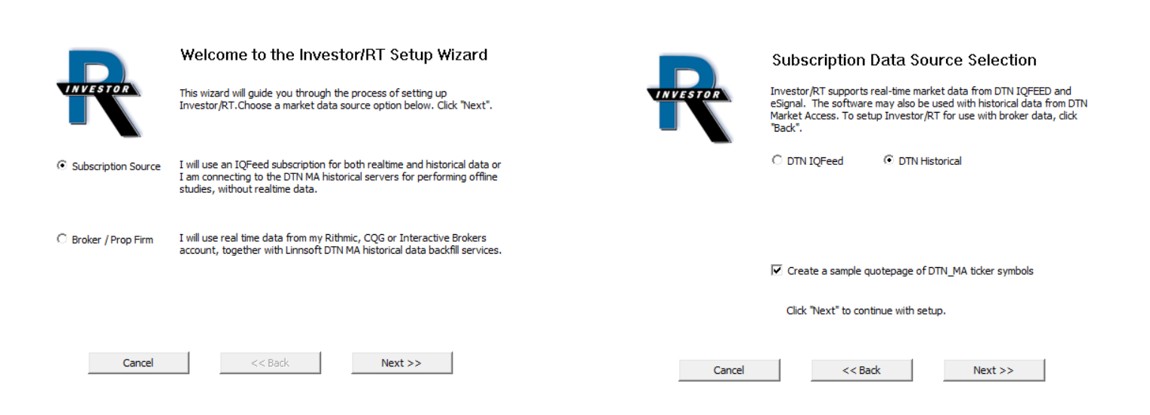
You will have to use the “Data > download” menu features to update quotes on a periodic basis.
III.2) Experimenting with new markets
You have access to ALL Historical data that is available through a full-fledged live IQ feed subscription (having subscribed to all future market exchanges or index data), i.e., all the data listed in our DTN symbol guide, but more generally to all data as listed on the DTN IQ feed website. Here are a few recommendations
- Importing an existing database image
If you are importing, as a starting point of your DTN MA instance, a restore point, i.e; a database image bakcup including charts setups that were using instruments based on a broker datafeed, you have to delete (with the Object manager > instrument menu) any predefined broker symbols, as all instruments, in this instance configured for DTN MA, should follow the DTN symbol nomenclature. The good news is that you can setup, once for all, the continuous contracts symbols (no need to update the symbol at every roll over)
- Use the Market playback feature and the Investor/RT built-in trading simulator
Ultimately, you could switch to a full-fledged DTN IQ feed subscription to get live data for all the symbols you were accessing through punctual downloads and execute your futures or stock trading orders towards your Rithmic, CQG or IBKR account (as explained in the IQ feed setup guide). In such a scenario, after reconfiguring it for a live IQ feed subscription, one can reuse “instantaneously” the DTN MA database as both share the exact same instrument symbol names.
Reminder - The DTN MA subscription monthly fee is 15 $ (10 $ for an IRT/Pro license). The fee is waived for Trial users. Approximately 90% of our brokerage feed clients use DTN MA for backfill, a good indication of its value.