

The Format Definition Preferences Windows are essentially the same for both QuotePage and Portfolios. Use this preference window to select the QuotePage or Portfolio column headings to view and create customized quote page layouts. The Format dropdown menu in the upper right corner lists the predefined formats; as one is selected, the corresponding Data Items will list in order in the list box on the right.
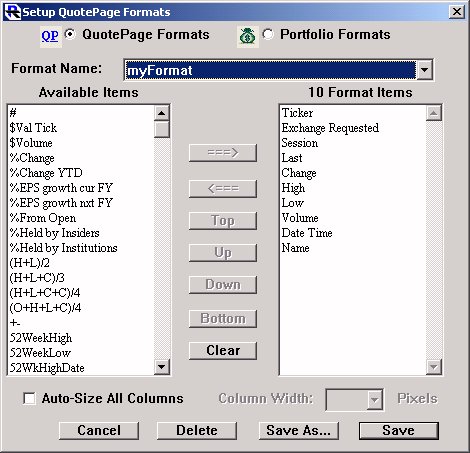
To create a custom format, start with "New Format" or select another format to modify. Select the desired headings from the "Data Items" field and click on "Add=>" to move them into the field on the right or simply double-click the selection you want to move. Multiple selections may be moved at once by holding the Option key (Mac) or Ctrl key (PC) while clicking on Data Items. Once you have the desired data items, you may rearrange the order by clicking on an item and clicking the "Move Up" and "Move Down" buttons. The final Quote Page layout may be saved using the "Save" or "Save As..." buttons at the bottom. If you click "Save" after altering an existing format, your new format will replace the former format. If you click "Save As..." or you started with "New Format," you will be prompted for a name. The new name will become part of the dropdown list. To eliminate a format from the list, select the format and click "Delete". There are two special formats that are used by Investor/RT for special purposes. The format "Import Format" is used by the Dial/Data download software within Investor/RT to process current quotes and historical data into the Investor/RT database. This format should NOT be modified for any reason if you use or plan to use Dial/Data. Doing so will cause Dial/Data downloading to improperly process the historical data or quotes. The format, "Fundamentals Format" is a special format used to specify which of Dial/Data's fundamental data items to download when a fundamental data download request is made. This format may be revised by the user to include non-fundamental as well as any fundamental data items you wish to acquire for the stocks being tracked by Investor/RT.
As of 7.2, this window has a new checkbox titled "Auto-Size All Columns". Each quotepage or portfolio format by default will have this option turned off. If you turn this option on for any format (and save the format), then Investor/RT will always "optimize" column widths whenever the format is applied to a quotepage or portfolio. This option also affects the appearance of quotepages that are produced by a scan. If a scan specifies a particular format for the resulting quotepage (instead of "automatic"), then this Auto-Size option will control whether the scan's resulting quotepage is displayed using the fixed pixel widths for each column, or widths optimized to the data content of the quotepage.