

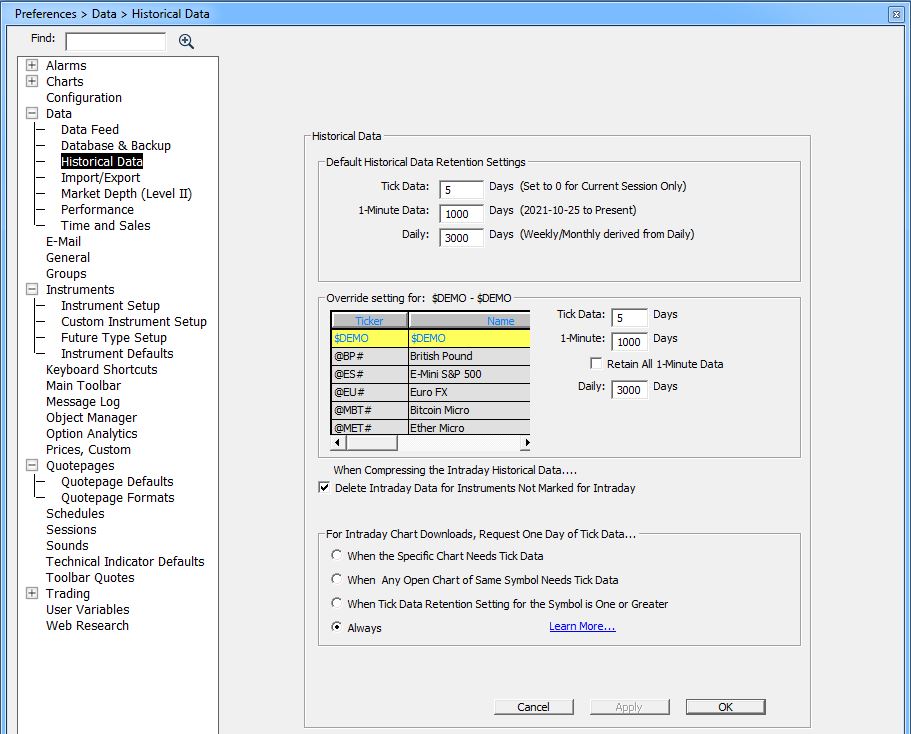
The Historical Retention Preferences window is used to control the amount of historical data stored on the Investor/RT database and to specify other options relating the downloading/maintenace of historical data. Prudent limits on data retention will help manage your computer resources and optimize performance of the software. Review this support page if you are not yet familiar with Investor/RT data download main settings.
Default Historical Data Retention Settings
The 3 number boxes next to Tick, IntraDay and Daily represent global data retention settings for Investor/RT. These are the default retention periods for all instruments for which you have not specified an override (an exception).Please note that Intraday and daily retention periods are expressed in trading days, not calendar days.
- The "Tick" box tells Investor/RT how many days of tick data to retain. A value of 0 indicates that no long term tick data will be retained, only the ticks captured live during the current trading session will be available for charts that need tick data. Current default is 5 day
- The "Intraday" box specifies how many total days of intraday data to retain and the box to the right of it specifies the interval (usually 1 minute) to use for intraday data beyond the number of days of ticks specified. Current default is 1000 (trading) days, ie almost 5 years of trading
- The "Daily" box tells Investor/RT how many days of daily data to retain. The default is 3000 (trading) Days. (ie approximately 14 years).
The "Tick" days must be less than or equal to the number of "Intraday" days. For example, if Intraday days is 120 and Tick days is 5, then Investor/RT will keep 5 days of tick data and maintain 115 days of longer term intraday data as one minute interval data.
Overriding the Default Settings
You may override the global settings on an individual instrument basis.
- Method 1: using the Historical data preference window - Select the desired instrument using the Instrument Selector in the "Override Settings"secon. Then set your preferred data retentionsettings for that instrument.
- Method 2: using a QuotePage- Select tha All symbol or another quitepage. Add the Retain TickData, Retain Intraday and Retain Daily colums on that a Quotapge and override the default settings there by directly typing a nuymber of days in the corresponding cell.
- Method 3: Running a dedicated scan. Use a scan to adjust the retention periods for a group of symbols listed in a quotepage, with the SET statements that are referring to the RTL tokens: HRI, HRT and HRD tokens. For example, the scan formula: SET(HRI, 1500) AND SET(HRT, 30) sets the intraday retention (ie 1 min bar) to 1500 days and the tick retention to 30 days for the list of symbols in the quotepage included in the scan settings window.
Tick Data Downloading Options
The bottom section of the Historical Retention Preferences section allows the user to control how Investor/RT decides whether to download tick data or minute interval data when a download request is made from a chart window. This setting is not relevant for the vast majority of Investor/RT subscribers who monitor Futures and use the default Backfill Automation mode to keep their charts up to date with tick-by-tick data.
Modifying the "Always" default settings will be only of interests for subscribers that monitor with IQ feed a huge number of stocks.
Some chart types, such as TPO Profile, Footprint Charts, range or renko bar charts implicitly require tick data. Other chart types can make do with one minute interval data. Investor/RT can produce N-minute bars from the ticks and one minute bars retained on the database. When downloading intraday historical data for a chart, the downloaded data replaces the data already on file for the same period of time. If minute interval data is downloaded for some number of days, the minute bars will replace any tick data that may have been downloaded earlier or collected real-time over that period of time. The Tick Data Downloading options give the user a way to ensure that chart downloads request ticks; this ensures that tick data continues to be available for the charts that need them. There are four options within the section titled
For Intraday Chart Downloads, Request One Day of Tick Data...
- Option 1: When the Specific Chart Needs Tick Data. This option tells Investor/RT to consider only the chart from which the download request was initiated. If the chart needs tick data, the download will request one day of tick data. Otherwise, minute interval data will be downloaded for the charting period. This is the default setting for the Investor/RT product line.
- Option 2: When Any Open Chart of Same Symbol Needs Tick Data. This option tells Investor/RT to consider the chart at hand plus any other open charts that contain the same ticker symbol. If any of the open charts require tick data, the download will request one day of tick data. Otherwise, minute interval data will be downloaded for the charting period. For example, if you have a mix of intra-day charts open, various minute intervals and one or more tick/bar charts for some symbol, then Investor/RT will detect the tick/bar chart and force the download of one day of tick data, regardless of which chart you use to initiate the download.
- Option 3: When Tick Data Retention Setting for the Symbol is One or Greater. This option tells Investor/RT to consider all open charts as with Option 2 above, and to consider in addition the tick retention setting for the instrument in question. If the instrument uses the default tick retention setting or an override setting specifying one or more days of ticks, then the download request will proceed with one day of tick data, even if there are no charts open at the moment that would otherwise call for a tick data download.
- Option 4: Always. This option tells Investor/RT that all chart initiated intraday downloads should request tick data for one day.
This 4-way setting controls how Investor/RT decides whether to download ticks or minute interval data when you tap the space bar or click the download button for an intra-day chart.
The setting also pertains to "automatic downloading" if that option is activated in File: Preferences: Charts: General. Manual downloads are always available via the Download Data button on the main toolbar (or using the Alt-D shortcut). When the Download Data window appears, the user can adjust the periodicity of the download to one minute or tick, revise the number of days to download, etc.
Note that if you download minute interval data, the downloaded data will replace any ticks on file for the download period. If you subsequently open a chart that needs tick data, another (tick) download will be required to bring in tick data for one or more days as needed.
To make this easier, Investor/RT has a "Full Download" command available in the pop up menu of chart windows. This command will download minute interval data for the number of days specified in the Intraday historical retention setting for the symbol, following by a download of tick data if the tick retention for the symbol is one day or more. Full Download also requests daily historical bars for the number of days specified for the instrument's "Daily" retention setting.