

The trading hours for Futures or Equities vary considerably depending on the markets. Investor/RT handles this variability by allowing the user to define multiple individual trading Sessions.
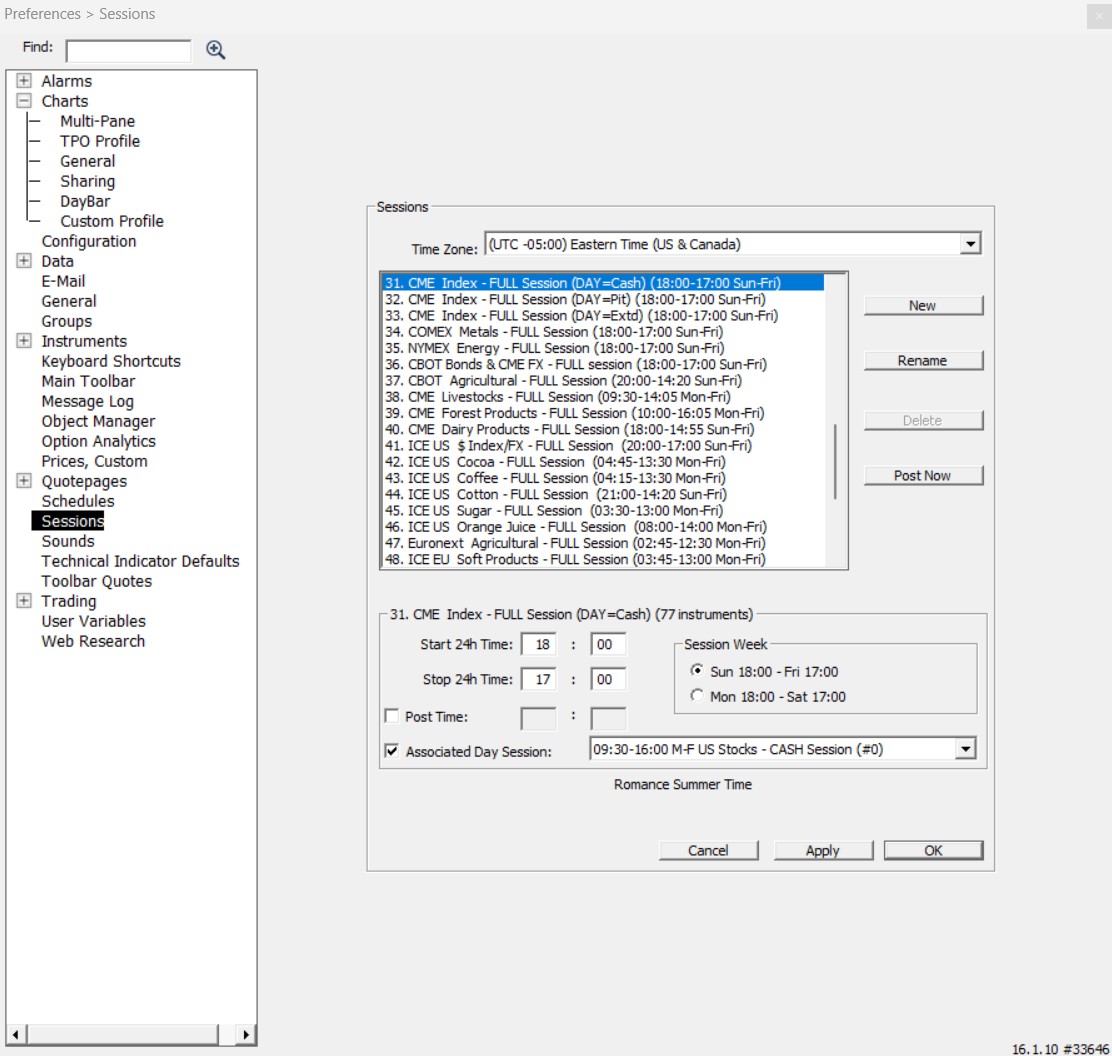
Please review the Sessions 101 support page for an in-depth presentation of the potential use of each individual session as "Full" session, "Day" Session or "Chart Session", and a presentation of the recommended full & day session pairs for each main US and European future markets.
Time Zone: All times used to set up a session should be in the user's local time (not the exchange time).
Please note that the time zone setting on your PC should always match the Time Zone in the Session Preferences window to ensure that the timestamps of live quotes received by I/RT are processed correctly. For example, a user residing in the Pacific Time Zone should set the time zone at the top of the Sessions window accordingly and set up their US Stock Market Trading Session (usually session 0) to start at 6:30 a.m. and end at 1:30 p.m. If you are travelling, but want to keep your usual session hours being displayed within I/RT, just deactivate the automatic Time Zone recognition within your Windows OS so that your PC clock remains synchronized with your local home address. If the two settings aren't similar, you will receive a warning message from I/RT at startup.
Each individual session has the following attributes:
- Session Number and Session Name. Investor/RT comes with a list of predefined sessions associated with a specific Number. These are fully customizable by each user.
- Start and End Times (as per the local user timezone selected at the top of the window)
- Post time (optional) - The "Post Time" is the time of day, usually just a few minutes after the close time, at which Investor/RT records (posts) the closing prices in the historical database. Posting is initiated automatically for each session for which there are instruments assigned. When posting takes more than a few seconds, a progress box is used to inform the user that posting is underway.
- Session Week - Determines whether the Session should run Monday through Friday (typical for equities sessions) or Sunday through Friday (typical for Futures sessions).
Each time you setup (define) a new instrument to Investor/RT, you must specify the Full session for the instrument, possibly associated with a Day session. The full session dictates the trading hours for the instrument, which ultimately defines the hours that Investor/RT will collect data for instruments assigned to a given session. What is important to have in mind:
- Only a single Day Session # can be linked with a given (Full) session number. This is why IRT now offers, by default, different session numbers (31 to 35) that all match the same Globex session hours, but are associated with different day session hours.
- A given Session # can be used as a day session for different full sessions. For example, Session #00 can be simultaneously used as the “Day Session” for both the full session of the Nasdaq stocks (Session #01) and of the US equity Index futures (Session #31).
Whenever you open a chart, in the period tab, you are able to select a "chart session": this session has to be a sub-session of the instrument's full session
The New, Rename, and Delete buttons may be used to create, rename, or delete sessions. However, a session may NOT be deleted if there are instruments assigned to the session. A line above the Session selection box displays the number of symbols being tracked during the selected session. Every instrument must be assigned a trading session. Deleting predefined sessions is not recommended, though they may be renamed. A user tracking the stock market might require only Session 0 (U.S. Stocks session). A user tracking a mixture of stocks, options, futures options, commodities, etc. might need a variety of trading sessions, one for each market being monitored.
Generally, it is unnecessary to create a new session (although you can if you'd like), unless you have added a new market with full trading session hours that do not exist in the pre-installed list of sessions. Instead, it is more convenient to simply rename one of the existing sessions that are currently not being used.
Here is the list of predefined sessions that comes from a fresh install performed with I/RT version 16 beta 10 (or later) and that covers the needs of the vast majority of our users.

You will notice that Sessions #30 to 60 are typically used as Full Session (ie reflecting the market opening hours of a given group of futures), while the first Session numbers are typically used to reflect a Day Session (or another Subsession of a full session).