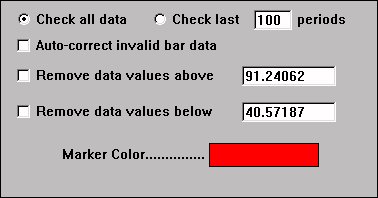
The Data Validation Technical Indicator is a legacy charting or scan indicator that inspects the data for some instrument and looks for exceptional conditions. The data validation indicator when used in a chart window has an option to remove any data bars or ticks having a price that is outside some user specified acceptable range. This indicator is rarely if ever needed at present. At one time, it filled an important need when real-time data streaming and historical data services were less reliable and thus correction of invalid data points was sometimes needed.
The Data Validation indicator resides in the chart window and "recalculates" each time a tick arrives. If the tick is out of the user specified range, it is removed automatically from the chart. The bad tick has no effect on the chart or any other technical indicators in the chart window. The data validation indicator does not delete the "bad ticks" from the database, is only removes them from the chart window. If you open another chart of the same instrument that does not have a data validation indicator in it, the "bad ticks" will be present. The Data Validation indicator also has a checkbox titled "Auto-correct invalid bar data". When checked, the indicator will "fix" any bars where the relationship between open, high, low, and close is invalid (e.g. close less than low). The "fix" employed by Investor/RT is to adjust the bar so that open, high, and low are all set to the last trade price. Note the these "auto" fixes will impact the calculation of any technical indicators based on the associated instrument. It is recommended that you first add the Data Validation indicator to the chart window with the "Auto-Correct" box unchecked to see if any invalid bar data is present in the chart, if so you may elect to fix it by turning on the "Auto-Correct" checkbox.
Presentation
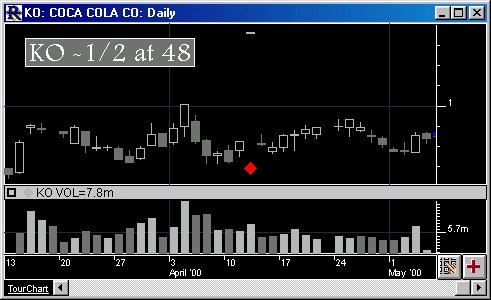
Above is a Daily Candlestick Chart of Coca Cola (KO). The red diamond see in the chart is an indication of invalid data.