Home                           

 Try Investor/RT             

 Investor/RT Tour           

 Getting Started              

 What's New                  

 Testimonials                 


MASTER INDEX
  SEARCH
  CHARTS
  MAIN TOOLBAR
  SETTING PREFERENCES
  TECHNICAL INDICATORS
 
WHAT'S NEW
  ALARMS
  BACKTESTING

  CONFIRMING TRADES
  CUSTOM COLUMNS
  CUSTOM INDICATORS
  CUSTOM INSTRUMENTS
  CUSTOM PRICES
  DATA FEEDS
  DATABASE
  DOWNLOADING DATA
  FEED STATUS
  HEARTBEAT
  HELP
  MULTI-LINKING
  MULTI-PERIODICITY
 
INSTRUMENT SETUP
 
NASDAQ LEVEL II
 
NEWS TICKER
 
NEWS BROWSER
  OPTIMIZATION
  OPTIONS ANALYTICS

  PLACING TRADES
  PORTFOLIOS
  PRESETS
 
PRINTING
  QUICK QUOTES
  QUOTE PAGES
  REALIZATION
  RTL LANGUAGE
  SCANS
  SCHEDULES

  SCOPE
  SYSTEM STATUS
  TICKER TAPE
  TIME AND SALES

 
TRADING NOTES
  USER VARIABLES
  VERTICAL SCALE
MASTER INDEX
DICTIONARY
FEEDBACK

Investor/RT Tour ( more on Technical Indicators )
Gann Lines and Gann Angles

Also see: The Owl

The Formula . . . 

. . .more on Formulas 

The 1x1 line is drawn from a significant low to a significant high.  This line represents a 45 degree angle, or a slope of 1.  Other angles are then drawn as multiples of the 1x1 line, with the same origin.  For instance, the 2x1 line is drawn as a line with twice the slope of the 1x1 line but beginning at the same point.
 
The Presentation . . . 

. . . more on Charts 

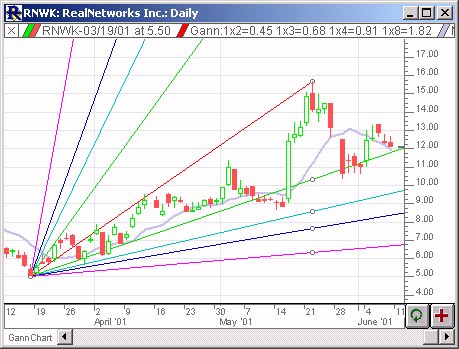
Above is a Daily Candlestick Chart of Real Networks (RNWK) .  The red line represents the 1x1 Gann Angle, the green lines represent the 1x2 and 2x1 angles, the aqua lines represent 1x3 and 3x1 angles, the blue lines represent 1x4 and 4x1 angles, and the purple lines represent 1x8 and 8x1 angles.

 
The Preferences . . . 

. . . more on Preferences 

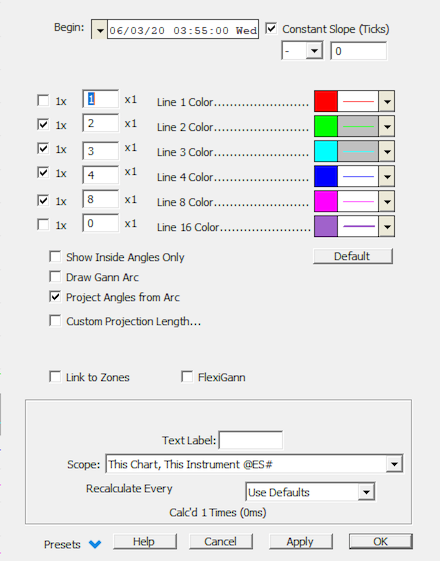
  • Begin - The date/time of the bar to which the beginning of the 1x1 line is attached.

  • End - The date/time of the bar to which the ending of the 1x1 line is attached.

  • 1 x __ x 1 - There are up to 5 customizable Gann angle multiples, each with their own color, line thickness and line style.

 
The Description . . .
William Gann (1878-1955) developed a unique combination of geometric and mathematical principles, which he applied to trading stocks and commodities. The proportional relationship of time to price was the basis for much of Gann's work.

Price and time come together in Gann angles, which project trend lines from important tops or bottoms. All of Gann's angles are quoted in price to time relations, (i.e., 1 x 8). Translated, this means move 1 unit of time to the right and 8 units of price, up or down. The angle representing price and time in balance is 45 degrees (1 x 1, price to time). To Gann, this was the most important angle. Other important angles, in order of importance are: 2 x 1 and 1 x 2, 4 x 1 and 1 x 4, 8 x 1 and 1 x 8. These lines are drawn down from the top or up from the bottom.

Keyboard Adjustment . . .
The keyboard can be used to move the Gann Angles begin and end points left and right.  First, click on the chart.  Then hit the tab key repeatedly until you notice your Fibonacci Retracement lines are selected.  Then, press the right or left arrow keys on your keyboard to move both the begin and end points right or left one bar.  If you would like to move only the endpoint, then hold down the Ctrl key while pressing the right or left arrow keys.  If you would like to move only the beginning point, then hold down the Shift key while pressing the right or left arrow keys.  You can also drag the begin and endpoints of the 1x1 angle to other positions on the chart.
For more information on Adjusting Technical Indicators, click here.