Home                           

 Try Investor/RT             

 Investor/RT Tour           

 Getting Started              

 What's New                  

 Testimonials                 


MASTER INDEX
  SEARCH
  CHARTS
  MAIN TOOLBAR
  SETTING PREFERENCES
  TECHNICAL INDICATORS
 
WHAT'S NEW
  ALARMS
  BACKTESTING

  CONFIRMING TRADES
  CUSTOM COLUMNS
  CUSTOM INDICATORS
  CUSTOM INSTRUMENTS
  CUSTOM PRICES
  DATA FEEDS
  DATABASE
  DOWNLOADING DATA
  FEED STATUS
  HEARTBEAT
  HELP
  MULTI-LINKING
  MULTI-PERIODICITY
 
INSTRUMENT SETUP
 
NASDAQ LEVEL II
 
NEWS TICKER
 
NEWS BROWSER
  OPTIMIZATION
  OPTIONS ANALYTICS

  PLACING TRADES
  PORTFOLIOS
  PRESETS
 
PRINTING
  QUICK QUOTES
  QUOTE PAGES
  REALIZATION
  RTL LANGUAGE
  SCANS
  SCHEDULES

  SCOPE
  SYSTEM STATUS
  TICKER TAPE
  TIME AND SALES

 
TRADING NOTES
  USER VARIABLES
  VERTICAL SCALE
MASTER INDEX
DICTIONARY
FEEDBACK

Investor/RT Tour ( more on Technical Indicators )
IAA - Indicator Adjusted Average
The Formula . . . 

. . .more on Formulas 

IAA = MA(Price, Simple, n)

where...
   n = IND * (maxN - minN) / (maxIND - minIND)
   maxN = Maximum Period
   minN = Minimum Period
   IND = Indicator Value at current bar
   maxIND = Maximum Indicator Value in chart
   minIND = Minimum Indicator Value in chart

 
The Presentation . . . 

. . . more on Charts 

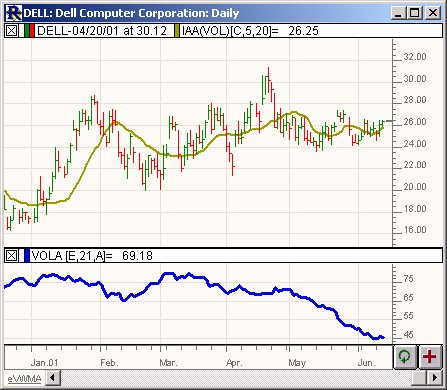
Above is a Daily Candlestick Chart of Dell Computers (DELL).  The bold brown line in the upper window pane represents a Volatility Adjusted Average of the closing price using the preferences below.  The volatility is also depicted in the lower window pane in bold blue.
 
The Preferences . . . 

. . . more on Preferences 

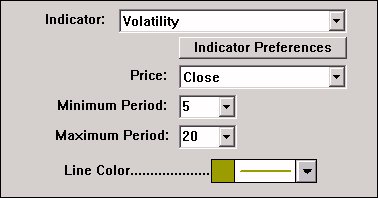
  • Indicator - Indicator which will be used to determine the smoothing period.

  • Indicator Preferences - Clicking on this button will bring up the preferences for the indicator listed in the list box above.  You can set up specific preferences for the adjusting indicator.

  • Price - Data value used for computation of the adjusted average.

  • Minimum Period - Lower limit for the adjustable period being used.

  • Maximum Period - Upper limit for the adjustable period being used.

  • Line Color - Color used to draw the adjusted average line in the chart.

 
The Description . . .

The Investor/RT indicator entitled “Indicator Adjusted Average” allows the user to create a Moving Average whose period varies within a specified range and is determined based on the value of any other selected indicator within that indicators range.  The indicator used to control the variance of the moving average period can be any of the 80+ predefined indicators or even a custom indicator created using the Investor/RT RTL language.  The preferences for the Indicator Adjusted Average can be seen above.

The development of the Indicator Adjusted Average was inspired by the article entitled "Variable Interval Moving Average" in the July 2001 issue of Stocks and Commodities Magazine.  The best way to simulate the Variable Interval Moving Average is to use a Volatility Indicator as the underlying indicator in the Indicator Adjusted Average study, and assign a range of periods from 10 to 50.

The range of maximum and minimum volatility values will be calculated, and then compared to the volatility values for each bar to decide which period between the maximum / minimum range will be used to compute the moving average for that bar.  The Indicator Adjusted Average may also be used in the Investor/RT Scan language to automatically search for crossovers or breakouts.  The scan token is IAA.