Home                           

 Try Investor/RT             

 Investor/RT Tour           

 Getting Started              

 What's New                  

 Testimonials                 


MASTER INDEX
  SEARCH
  CHARTS
  MAIN TOOLBAR
  SETTING PREFERENCES
  TECHNICAL INDICATORS
 
WHAT'S NEW
  ALARMS
  BACKTESTING

  CONFIRMING TRADES
  CUSTOM COLUMNS
  CUSTOM INDICATORS
  CUSTOM INSTRUMENTS
  CUSTOM PRICES
  DATA FEEDS
  DATABASE
  DOWNLOADING DATA
  FEED STATUS
  HEARTBEAT
  HELP
  MULTI-LINKING
  MULTI-PERIODICITY
 
INSTRUMENT SETUP
 
NASDAQ LEVEL II
 
NEWS TICKER
 
NEWS BROWSER
  OPTIMIZATION
  OPTIONS ANALYTICS

  PLACING TRADES
  PORTFOLIOS
  PRESETS
 
PRINTING
  QUICK QUOTES
  QUOTE PAGES
  REALIZATION
  RTL LANGUAGE
  SCANS
  SCHEDULES

  SCOPE
  SYSTEM STATUS
  TICKER TAPE
  TIME AND SALES

 
TRADING NOTES
  USER VARIABLES
  VERTICAL SCALE
MASTER INDEX
DICTIONARY
FEEDBACK

Investor/RT Tour ( more on Technical Indicators )
Normalized Price
The Formula . . . 

. . .more on Formulas 

NP = ((PR - BASE) / BASE) * 100  ; where BASE is the base price at the date specified
 
The Presentation . . . 

. . . more on Charts 

Normalized Price

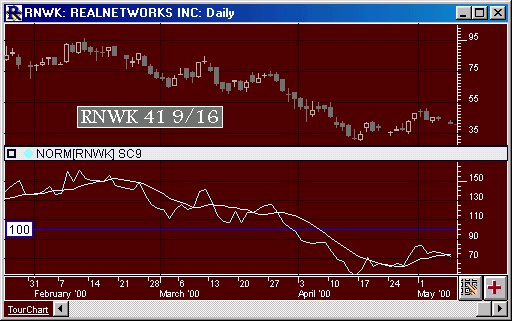
Above is a Daily Candlestick Chart of an Real Networks Corporation (RNWK).  The aqua line represents the raw normalized value, while the white lines represents a moving average of the raw normalized values, based on the preferences below.
 
The Preferences . . . 

. . . more on Preferences 

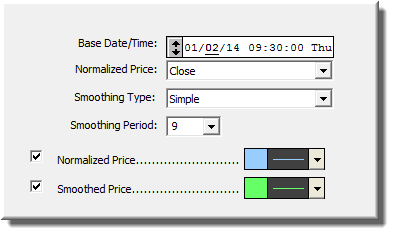
Normalized Price Preferences

  • Base Date/Time - Date from which to extract the base value to be used to normalize the price.

  • Normalized Price - Price used for normalization.

  • Smoothing Type - Smoothing type used to smooth the resulting normalized data.

  • Smoothing Period - Smoothing period used to smooth the resulting normalized data.

  • Normalized Price - Check this box if you would like to see the raw normalized data, and specify the color to the right.

  • Smoothed Price - Check this box if you would like to see the smoothed normalized data, and specify the color to the right.

 
The Description . . .
The Normalized Price indicator graphs the price movement of an instrument using 100 as the base value for a user specified base date/time. The normalized value for each bar after the base date/time is the percent of the base price expressed as a whole number. (i.e. 100 times actual price divided by actual base price) 

This indicator shows the percentage move in price relative to some fixed starting point. For example, if you add this indicator to a daily chart using 12/31/99 as the based date, the indicator line will show you how the issue has performed since the beginning of year 2000. Values above 100 indicate the percentage increase in price since the beginning of 2000. For example, a value of 115 means the price has increased 15% since the base date, while a value of 82 would indicate a decline of 18% since the base date. 

The "price" graphed can be any of the standard Investor/RT price values: close, high, low, high + low average, or high + low + close average. An optional smoothing can be applied to the resultant graph. For example, if the actual closing prices beginning at the base date/time were: 

Another purpose of the Normalized Price indicator is to provide a means of easily comparing the price action of two or more instruments since some fixed starting point. When a chart window contains two or more instruments, you may create normalized lines for each of the instruments and add them all to the same pane. Be sure to use the same base date/time in all normalized price indicators.