Home                           

 Try Investor/RT             

 Investor/RT Tour           

 Getting Started              

 What's New                  

 Testimonials                 


MASTER INDEX
  SEARCH
  CHARTS
  MAIN TOOLBAR
  SETTING PREFERENCES
  TECHNICAL INDICATORS
 
WHAT'S NEW
  ALARMS
  BACKTESTING

  CONFIRMING TRADES
  CUSTOM COLUMNS
  CUSTOM INDICATORS
  CUSTOM INSTRUMENTS
  CUSTOM PRICES
  DATA FEEDS
  DATABASE
  DOWNLOADING DATA
  FEED STATUS
  HEARTBEAT
  HELP
  MULTI-LINKING
  MULTI-PERIODICITY
 
INSTRUMENT SETUP
 
NASDAQ LEVEL II
 
NEWS TICKER
 
NEWS BROWSER
  OPTIMIZATION
  OPTIONS ANALYTICS

  PLACING TRADES
  PORTFOLIOS
  PRESETS
 
PRINTING
  QUICK QUOTES
  QUOTE PAGES
  REALIZATION
  RTL LANGUAGE
  SCANS
  SCHEDULES

  SCOPE
  SYSTEM STATUS
  TICKER TAPE
  TIME AND SALES

 
TRADING NOTES
  USER VARIABLES
  VERTICAL SCALE
MASTER INDEX
DICTIONARY
FEEDBACK

Investor/RT Tour ( more on Technical Indicators )
Percent Change Volume or Price

The Formula . . . 

. . .more on Formulas 

PerChg = 100 * (Price - Price[n]) / Price[n]
 
; where n is the period and Price[n] is the price (or volume) n periods ago.
 
The Presentation . . . 

. . . more on Charts 

Percent Change Volume or Price

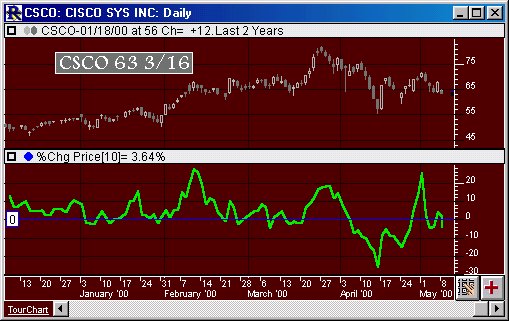
Above is a Daily Candlestick Chart of Cisco Systems (CSCO).  The bold green line in the lower pane represents the 10 Period Price Percent Change, as specified in the preference window below.  A horizontal reference line is automatically draw at zero.
 
The Preferences . . . 

. . . more on Preferences 

Percent Change Volume or Price

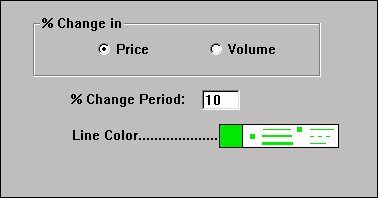
  • % Change in Price/Volume - Here you choose whether you want to use closing price, or volume for percent change data.

  • % Change Period - Number of bars back to compare the current data to when computing percent change.

  • Line Color - Color of percent change line in chart.

 
The Description . . .
The Percent Change Indicator calculates and draws a line showing the n-period percent change in either volume or price for an instrument. The indicator oscillates around zero with positive values indicating increasing prices (or volume) and negative values indicating declining prices (or volume). If you wish to see both percent change to volume and percent change in price in the same chart, apply the indicator multiple times , once with "Price" check marked, and again with "Volume" check marked. You can add both to the same chart window pane if you like. 

This indicator graphs the percent change in price or volume (or both) over a specified time period. It can be very useful in gauging whether volume has confirmed a price move by increasing with the move. By the same reasoning, decreasing volume while price moves in a given direction may represent the countertrend.