|

MASTER INDEX
SEARCH
CHARTS
MAIN TOOLBAR
SETTING PREFERENCES
TECHNICAL
INDICATORS
WHAT'S NEW
ALARMS
BACKTESTING
CONFIRMING TRADES
CUSTOM
COLUMNS
CUSTOM
INDICATORS
CUSTOM
INSTRUMENTS
CUSTOM PRICES
DATA FEEDS
DATABASE
DOWNLOADING
DATA
FEED STATUS
HEARTBEAT
HELP
MULTI-LINKING
MULTI-PERIODICITY
INSTRUMENT SETUP
NASDAQ LEVEL II
NEWS TICKER
NEWS BROWSER
OPTIMIZATION
OPTIONS
ANALYTICS
PLACING TRADES
PORTFOLIOS
PRESETS
PRINTING
QUICK
QUOTES
QUOTE PAGES
REALIZATION
RTL LANGUAGE
SCANS
SCHEDULES
SCOPE
SYSTEM STATUS
TICKER
TAPE
TIME AND SALES
TRADING NOTES
USER VARIABLES
VERTICAL SCALE
MASTER INDEX
DICTIONARY
FEEDBACK
|
Investor/RT Tour
( more on Technical
Indicators )
Trend Continuation Factor (TCF)
| The Formula
. . . |
. . .more
on Formulas |
IF (CL > CL.1)
+Change = CL - CL.1
-Change = 0
ELSE
+Change = 0
-Change = CL.1 - CL
IF (+Change = 0)
+CF = 0
-CF = -Change + -CF.1
ELSE
+CF = +Change + +CF.1
-CF = 0
TCF+ = SUM(+Change, n) - SUM(-CF, n)
TCF- = SUM(-Change, n) - SUM(+CF, n)
where n = period
|
| |
| The
Presentation . . . |
. . . more
on Charts |
|

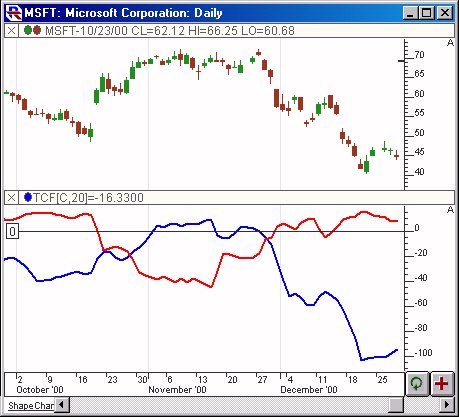
Above is a Daily Chart of Microsoft (MSFT).
The Trend Continuation Factor (TCF) is added to the lower window pane,
using the preferences seen below. The blue line represents the
TCF+ while the red line represents the TCF-. |
| |
| The
Preferences . . . |
. . . more
on Preferences |
|

|
-
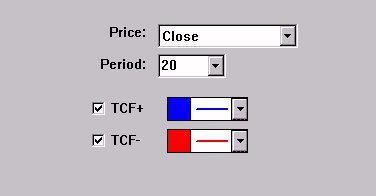
Price - Price
data used as input to the indicator.
-
Period - Period
used in TDI formula, as seen in the formula section above.
-
TCF+ - Check this box, and use this color control, if you would
like to draw the TCF+ line, or the Positive Trend Continuation
Factor.
-
TCF- -
Check this box, and use this color control, if you would like to
draw the TCF- line, or the Negative Trend Continuation Factor.
|
| |
| The
Description . . . |
| The Trend Continuation Factor (TCF) was
introduced by M. H. Pee. It was created to help identify the
trend, and it's direction.
Positive values of either the Positive Trend Continuation Factor
(TCF+) and the Negative Trend Continuation Factor (TCF-) indicate
the presence of a strong trend. Positive values of TCF+
indicator a strong uptrend, while positive values of TCF- indicate a
strong downtrend. TCF+ and TCF- cannot both be positive at the
same time, since both an uptrend and a downtrend cannot occur
simultaneously. Both can be negative. If both are
negative, this signifies consolidation, or the absence of a
trend. It recommended to enter long positions when the TCF+
value is positive, and enter short positions when the TCF- value is
positive.
Keyboard Adjustment
You can adjust the TCF period directly from the keyboard without
having to open up the TCF preferences window. Just select the
TCF indicator in the chart (either by tabbing to the indicator or by
clicking on it), and then simply hit the up arrow on they keyboard
to increase the period by one, and the down arrow on the keyboard to
decrease the period by 1.
|
|
|
|