Home                           

 Try Investor/RT             

 Investor/RT Tour           

 Getting Started              

 What's New                  

 Testimonials                 


MASTER INDEX
  SEARCH
  CHARTS
  MAIN TOOLBAR
  SETTING PREFERENCES
  TECHNICAL INDICATORS
 
WHAT'S NEW
  ALARMS
  BACKTESTING

  CONFIRMING TRADES
  CUSTOM COLUMNS
  CUSTOM INDICATORS
  CUSTOM INSTRUMENTS
  CUSTOM PRICES
  DATA FEEDS
  DATABASE
  DOWNLOADING DATA
  FEED STATUS
  HEARTBEAT
  HELP
  MULTI-LINKING
  MULTI-PERIODICITY
 
INSTRUMENT SETUP
 
NASDAQ LEVEL II
 
NEWS TICKER
 
NEWS BROWSER
  OPTIMIZATION
  OPTIONS ANALYTICS

  PLACING TRADES
  PORTFOLIOS
  PRESETS
 
PRINTING
  QUICK QUOTES
  QUOTE PAGES
  REALIZATION
  RTL LANGUAGE
  SCANS
  SCHEDULES

  SCOPE
  SYSTEM STATUS
  TICKER TAPE
  TIME AND SALES

 
TRADING NOTES
  USER VARIABLES
  VERTICAL SCALE
MASTER INDEX
DICTIONARY
FEEDBACK

Investor/RT Tour ( more on Technical Indicators )
Volume Price Statistics (VPS)

The Formula . . . 

. . .more on Formulas 


See "Preferences" section below.
 
 
The Presentation . . . 

. . . more on Charts 

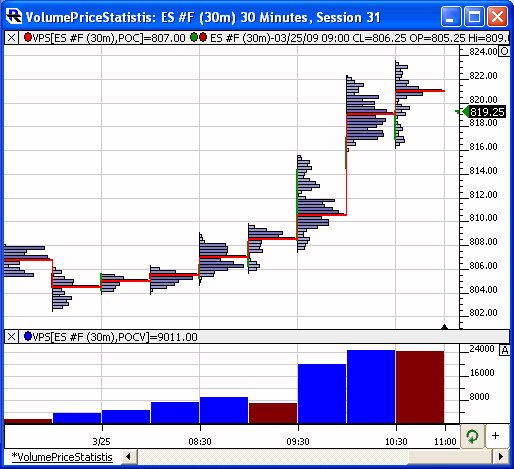
Above is a 30-minute of the S&P Mini Contract (ES #F, eSignal).  The VPS indicator is plotted twice in the chart.  In the upper pane, it's showing the Volume POC as a red stepped line.  In the lower pane, it's showing the POC Volume as a histogram.
 
The Preferences . . . 

. . . more on Preferences 

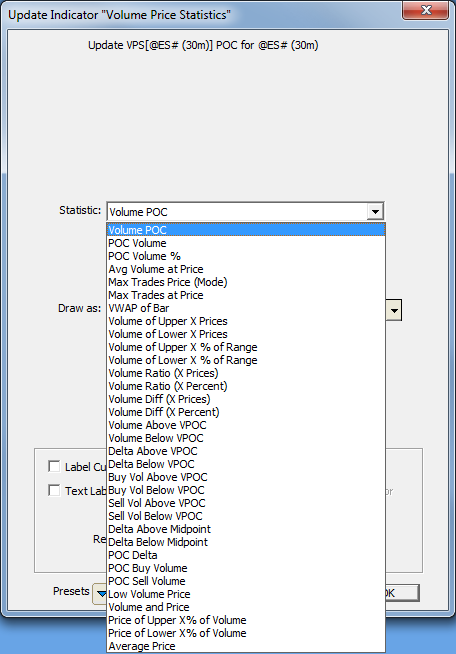
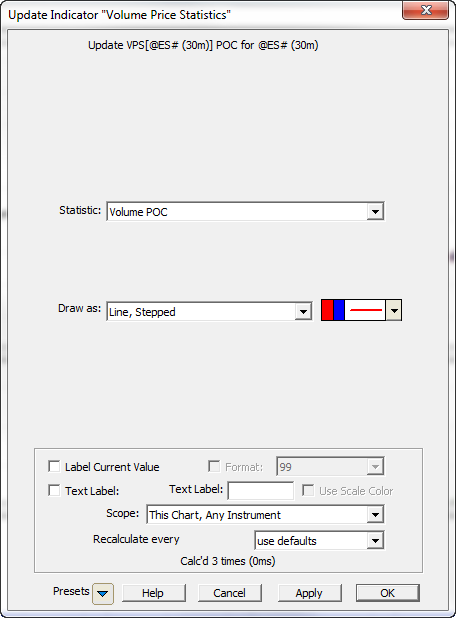
  • Statistic - Style and color used to draw the VWAP and VWAP bands (if applicable).
       - Volume POC - The volume based POC, or price within the bar at which the most volume traded.
       - POC Volume - The volume of the POC, or the maximum volume at any price within the bar.
       - POC Volume % - The POC Volume as a percent of the total volume of the bar.
       - Avg Volume at Price - The average volume at price of all prices traded within the bar.
       - Max Trades Price (Mode) - The price at which the most trades were executed.
       - Max Trades at Price - The maximum amount of trades at any single price within the bar.
       - VWAP of Bar - The volume-weighted average price, computed using the volume and price of all trades within the bar.
       - Volume of Upper X Prices - The total volume of the highest x prices in the bar.
       - Volume of Lower X Prices- The total volume of the lowest  x prices in the bar.
       - Volume of Upper X % of Range - The total volume of the highest x% of the range of the bar.
       - Volume of Lower X % of Range- The total volume of the lower x% of the range of the bar.
       - Volume Ratio (X Prices) - Ratio of the volume at the upper x prices divided by the volume at the lower x prices.
       - Volume Ratio (X Percent)- Ratio of the volume at the upper x% of bar divided by the volume at the lower x% of bar.
       - Volume Diff (X Prices) - Difference between the volume at the upper x prices and the volume at the lower x prices.
       - Volume Diff (X Percent)- Difference between the volume at the upper x% of bar and the volume at the lower x% of bar.
     

  • Draw as - Style, color, and size used to draw the VPS indicator within the chart.

 
The Description . . .
The Volume Price Statistics indicator provides the user with a variety of statistical measures based on the volume at price.  These statistic options are described in more detail above.
RTL Token . . .VSP ( more )
The RTL Token for the Volume Price Statistics indicator is VPS.  A signal that looks for the POC Volume to be greater than 1000 would use the following syntax:

VPS > 1000

Where VPS is setup with statistic "POC Volume".
 

Keyboard Adjustment . . .
NA

For more information on technical indicator adjustment, click here.
 

User Strategies . . . 

If you have a User Strategy you'd like to share, please email to support@linnsoft.com