

The Main Toolbar and Layout Toolbar provide convenient access to Investor/RT functionality and user-specified collections of windows (Layouts). There are many ways to customize the appearance of these toolbars and where they appear in your Investor/RT workspace.
Main Toolbar Preferences are set using File > Preferences > Main Toolbar. Here you can elect to show all available buttons, the default set of buttons, or any user-specified collection of buttons you use frequently. The main toolbar (and other object specific toolbars like the chart toolbar) can be shown in color or gray scale. This preference is set by right-clicking in the main toolbar message area and choosing Toolbar Style > Color Buttons to toggle colorization on/off.
Here is the Main Toolbar, setup to show all available buttons (button titles are shown here and are optional)

The buttons can be customized to the ones you use most often; here are the default buttons we recommand at minimum.
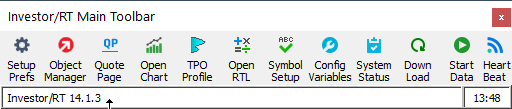
The Main Toolbar supports various styles: normal, slim, or condensed. When the main toolbar has the normal style, titles can be shown beneath each button. Slim or condensed style compact the display of the Main Toolbar without titles. Note that button help tips will appear for buttons on the Main Toolbar by hovering the mouse over a button for a second or two. The button help tip feature can be turned off it desired by right-clicking in the message area of the Main Toolbar and choosing Toolbar Style > Help Tips to toggle the tips on/off.
For users who make use of the Layout Toolbar there is a way to position the Layout Toolbarto the right of the Main Toolbar. This is accomplished by right-clicking in the message area of the Main Toolbar and choosing Layout Toolbar > Pin to Main Toolbar. There is also a configuration variable named PinLayoutToolbarAtStartup that can be set true using File > Preferences > Configuration, to make this positioning automatic each time Investor/RT starts up.
Another positioning option for the Main Toolbar is the anchored versus floating option. When the Main Toolbar is anchored it appears at the upper left corner of the Investor/RT main task window. You can detach the Main Toolbar and position it where ever you like by right-clicking in the Main Toolbar message area and choosing Main Toolbar > Anchored to toggle the anchored condition on/off. When the Main Toolbar is floating, both the Main Toolbar and the Layout Toolbar are designated as top most windows so that they float over other windows, e.g. when a chart is positioned on the same monitor. The keyboard shortcut Alt+T will alternately show and hide both toolbars if they are floating over something you wish to see.
If you want to float the Main Toolbar and do not want the Main and Layout Toolbars to float above your charts you can disable this behavior by setting the configuration variable FloatMainToolbarTopMost to false.
One more interesting customization when floating the Main Toolbar is to engage what is called the Auto-Hide style. You can toggle Auto Hide by right-clicking in the Main Toolbar and choosing Main Toolbar > Auto-Hide. This style causes the Main Toolbar to be positioned at the top of the display, out of the way of other Investor/RT windows, where it appears as a thin strip showing only the data feed heartbeat animation and the message area. When you wish to use the Main Toolbar, move the mouse pointer over the strip and it will automatically expand, giving you access to any of the buttons in the toolbar. After a few seconds with the mouse pointer away from the toolbar, is resumes its more condensed appearance at the top of the monitor.