

See Also: NASDAQ Level II Preferences
NASDAQ Level II windows in Investor/RT show the current bid/ask and bid/ask sizes for each market maker for a particular NASDAQ stock. The window updates tick by tick as trades occur and as level II data arrives on the data feed. Current market data including the bid tick indicator are displayed at the top of the window.
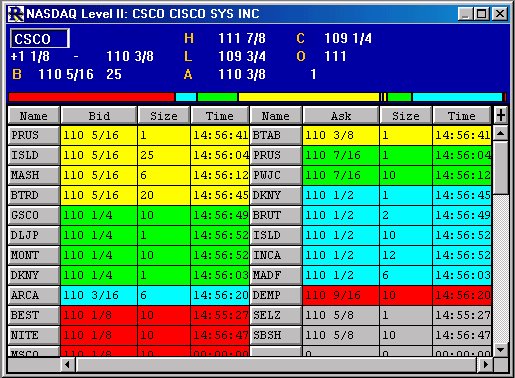
The market makers on the bid side are listed on the left side of the window ordered from best bid (highest bid) descending. The market makers on the ask size are listed on the right side of the window ordered from best ask (lowest ask) ascending. The first five levels of bid/ask prices are color coded with all market makers bidding or asking the same price have the same color code. In addition, Investor/RT shows a histogram that provides a graphical perspective on the proportion of volume (bid/ask sizes) at each of the top four prices levels. The bid sizes are shown on the left and the ask sizes are shown on the right. The bid/ask boundary point of the histogram shifts left and right as trading occurs to provide an overall picture of the ratio of bid size to ask size for the first four price levels as a whole.
To view NASD Level II for a particular NASDAQ stock, right click on the ticker symbol in any quote page, portfolio, or instrument selector list and choose "NASDAQ Level II" from the popup menu. On Macintosh, use command-click to access the menu.