

Submitted by linnsoft on Tue, 04/23/2013 - 20:47
× Note The standalone Point and Figure charts have been largely replaced by the Point and Figure periodicity of Traditional Charts.
See Also: Point and Figure Charts See Also: Three Line Break Charts See Also: Processing of Data for PNF and TLB Charts
Although the preferences seen below are labeled Three Line Break Preferences, they apply equally to Point and Figure Charts.
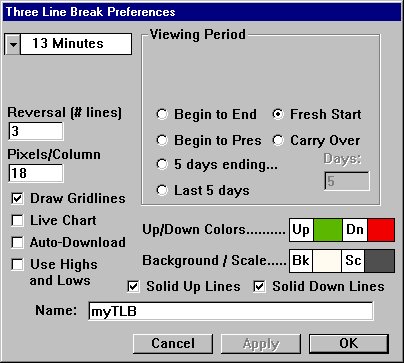
- Viewing Period - What it the range of time/dates from which the data for the chart should be extracted? Last 2 years, Last 10 days, 10/09/99 to Present, etc. If you choose Carry Over, then the last price of last bar of the previous day will be used as the first price processed, then the closing prices of the Intraday bars will be processed thereafter. If you choose Fresh Start, then the opening price of the first bar of the day will be the first price processed, followed by the closing price of each bar thereafter. These two options are only available for Intraday periodicities.
- Periodicity - What is the timeframe of the data that you would like to use to create the chart? . . . Daily, 1 Minute, 13 Minute, etc.
- Box Size (only applicable to PNF) - This is relevant for Point and Figure Charts only. Box size is essentially the height, in price, of each X or O (box) in the chart.
- Reversal (#boxes for PNF, #lines for TLB) - This setting represents the reversal criterion. For PNF charts, it represents the number of boxes which must be reversed in order to form a reversal. In TLB chart, it represents the number of lines which must be broken in order to form a reversal.
- Pixels/Column (Recommended - 12) - Number of pixels used for each column of Xs or Os in the case of PNF Charts, and the pixel width of each line for Three Line Break Charts.
- Draw Gridlines (Recommended - checked) - This checkbox specifies whether or not to draw the vertical and horizontal gridlines on the chart.
- Live Chart (Recommended - unchecked) - This checkbox determines how the new, real time data will be handled by your chart. If the "Live Chart" checkbox is checked, then a line will be drawn to the right of the chart that was built from historical data, and from this point forward, every tick will be processed by the chart. If this checkbox is left unchecked, then a timer will be set and data will be processed based on your periodicity. For instance, if you have a 13 minute periodicity, then every 13 minutes, the last price will be processed by your chart...and your chart will only receive new data every 13 minutes.
- Auto-Download (Recommended - unchecked) - If this checkbox is checked, Investor/RT will attempt to download data from your data vendor if you don't already have 90% of the requested data in your database.
- Use Highs and Lows (Recommended - unchecked) - This checkbox determines how historical data will be processed. When originally creating the chart from historical data, how should the data be handled. If this checkbox is checked, then the highs and lows are used (the details regarding the order in which these are processed is discussed below). If this checkbox is unchecked, then only the closing prices are used.
- Rising Color - The color of Xs for PNF Charts, and the color of rising lines for TLB Charts.
- Falling Color - The color of the Os for PNF Charts, and the color of the falling lines for TLB Charts.
- Background Color - The color of the background of the chart.
- Scale Color - The color of the scale markers and the text in the scale.
Below is the rules for processing historical data if you have the "Use Highs and Lows" checkbox checked. If the checkbox is unchecked, Investor/RT simply processes the closing price of each bar.
if (OP = CL) // if the Open and Close for the bar are equal { if (UP) process HI, LO, CL; // if currently in an up column else process LO, HI, CL; } else { if (OP > CL) process HI, LO, CL; else process LO, HI, CL; }