

Home                           

 Try Investor/RT             

 Investor/RT Tour           

 Getting Started              

 What's New                  

 Testimonials                 


MASTER INDEX
  SEARCH
  CHARTS
  MAIN TOOLBAR
  SETTING PREFERENCES
  TECHNICAL INDICATORS
 
WHAT'S NEW
  ALARMS
  BACKTESTING

  CONFIRMING TRADES
  CUSTOM COLUMNS
  CUSTOM INDICATORS
  CUSTOM INSTRUMENTS
  CUSTOM PRICES
  DATA FEEDS
  DATABASE
  DOWNLOADING DATA
  FEED STATUS
  HEARTBEAT
  HELP
  MULTI-LINKING
  MULTI-PERIODICITY
 
INSTRUMENT SETUP
 
NASDAQ LEVEL II
 
NEWS TICKER
 
NEWS BROWSER
  OPTIMIZATION
  OPTIONS ANALYTICS

  PLACING TRADES
  PORTFOLIOS
  PRESETS
 
PRINTING
  QUICK QUOTES
  QUOTE PAGES
  REALIZATION
  RTL LANGUAGE
  SCANS
  SCHEDULES

  SCOPE
  SYSTEM STATUS
  TICKER TAPE
  TIME AND SALES

 
TRADING NOTES
  USER VARIABLES
  VERTICAL SCALE
MASTER INDEX
DICTIONARY
FEEDBACK

Investor/RT Tour
Raw Tick Charts

See Also: Raw Tick Chart Prefences

The Raw Tick Chart provides a new perspective for viewing real-time ticks in Investor/RT. The chart does not consider the time elapsed between ticks, but instead places each consecutive tick equal distance apart.
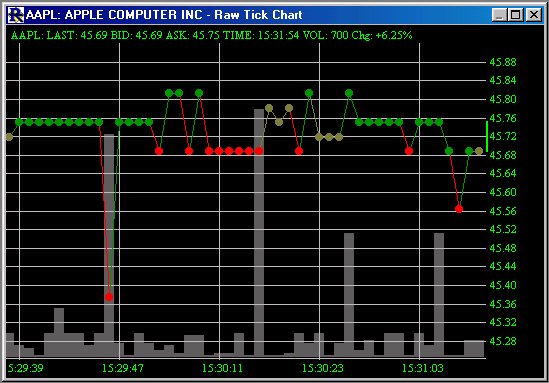
Raw Tick Chart

The tick chart overlays an optional volume histogram which provides a quick look at the volume for each tick. A message box at the top of the chart provides feedback on the last tick price, volume, time, bid, ask, and percent change. By moving your mouse pointer across previous ticks on the chart, the message box will give you information about those ticks.  A small line in the vertical scale provides you with the bid/ask spread.  The different color ticks represent buy ticks(ticks that traded at or above the ask - in green above), sell ticks(ticks that traded at or below the bid - in red above) and neutral ticks(ticks that traded between the bid and ask - in brown above).