

Related Renko Indicator Legacy Renko Charts
- Renko charts update dynamically tick by tick.
- True Renko square boxes built off tick data (or 1-min data)
- Build Renko charts using any box size
- Full library of over 150 built-in technical indicators to Renko charts, including Volume Breakdown, MPD, and TPO Indicators
- Full library of drawing tools, including 45 degree trendlines, reference lines, notes, Fibonacci, pivots, regression, and much more
- Add custom indicators writing in Investor/RT's RTL language (Targets)
- Write signals, add markers and alerts to Renko charts
- Write trading systems and backtest historical Renko data
- Flexible scaling, zooming, scrolling, and panning with drag and drop
- Keyboard and mouse wheel shortcuts for convenient manipulation of Renko charts
- Review historical Renko charts, going back weeks, months, or even years (varies with data vendor)
- Floating charts that may be dragged outside the Investor/RT task window
- View data from other periodicities (minute bars, tickbars, etc) on Renko charts
- Other helpful tools such as multi-chart highlighter, crosshairs, infobox, custom buttons, and multi-linking
- Autotrading available via the Trading System Indicator to limited brokerages
- Quickly switch chart between Renko and other periodicities (P&F, tickbar, minute bar, volume bar, daily, etc)
- All in one chart: Renko, P&F, TPO Profile (TPO indicator), Delta (Volume Breakdown Indicator), Other Periodicity Data, drawing tools, historical indicators, markers, alerts, and much more
Renko is now supported in traditional charts as a periodicity (and a drawing style). This significant enhancement marries the powerful features of the traditional chart window (indicators, buttons, multi-panes, etc) with this unique charting style.
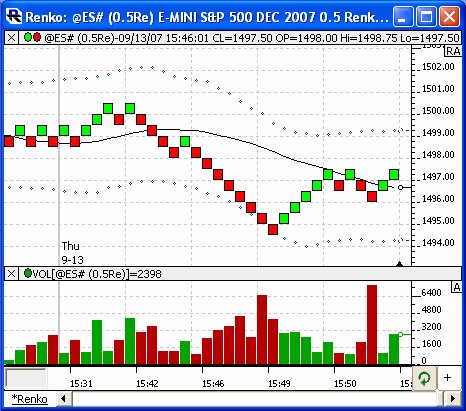
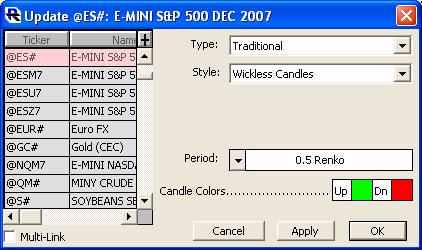
To change any existing chart to a Renko chart, simply double-click on the instrument (bars or candles) in an existing chart, and setup the chart with a Style of "Wickless Candles". Wickless Candles will result in the traditional Renko "boxed" look and feel. It will simply chart a box from open to close. Users may opt for the "Candlestick" style, which will not only give the open/close box, but provides additional information with the candle wicks representing the high and low of each bar.
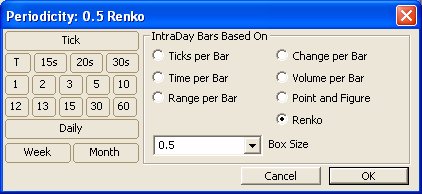
The Periodicity Control now has a new option of "Renko" just below the "Point and Figure" choice. Select this option, then provide a box size in the space provided below. The box size can range from the tick increment of the instrument (0.25 for ES) to multiples of the tick increment (0.5, 1, 2, etc).
In order to force each Renko box to be drawn perfectly square (the height of each box equals the width), a new vertical scale option has been added. Double-click in the vertical scale to bring up the vertical scale preferences. Select the 3rd Scaling Method specifying "Automatic scaling with Square boxes".
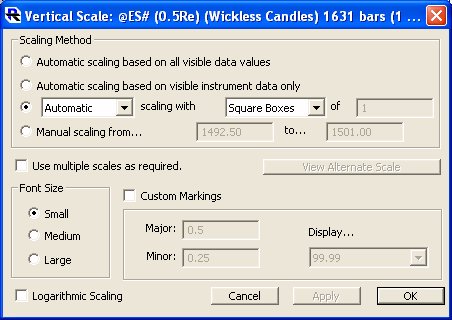
This option will keep the boxes square regardless of changes in chart dimensions, scrolling, or zooming. Some user may continue to prefer the Automatic scaling method, which tends to make better use of the vertical space in a chart. Once you've setup your scaling as "Square Boxes", you can easily toggle to automatic by clicking the "RA" until it becomes an "A", and toggle back to square boxes by again clicking on the "A" until it turns back into an "RA".
Investor/RT can be configure so that Renko bars reset at the beginning of each session (fresh start), or continue across session boundaries. The fresh start option is generally used for symbols that might gap heavily between session (and result in a long sequence of boxes to fill the gap). On symbols like ES that trade around the clock, the fresh start option is generally not needed or preferred. Go to "Setup: Preferences: Charts: General". If the "Continuous Tick & Volume Bars" checkbox is UNchecked, Renko charts will operate in "fresh start" mode. If it is unchecked, Renko charts will operate in "carry over" mode. Tokens have been added to RTL to support Renko. Scans, signals, and custom indicators operating with Renko periodic data can use these token to inspect the state and box size of the Renko boxes. These tokens are borrowed/shared with the PNF periodicity, and thus have PNF prefixes. To test the state of the PNF box use the PNF_STATE token. Constants PNF_UP and PNF_DOWN were added to enable expressions such as "PNF_STATE = PNF_UP" or "PNF_STATE = PNF_DOWN". The PNF_BOX token gives you the box size of the Renko data.
As an example, the following signal would look for 3 consecutive up boxes followed by a down box:
PNF_STATE.3 = PNF_UP AND PNF_STATE.2 = PNF_UP AND PNF_STATE.1 = PNF_UP AND PNF_STATE = PNF_DOWN