This message is of concern for every Investor/RT subscriber running a 15.1.25 (or earlier) version and facing an "DTN server clock" error message from March 8th 2026 onwards
Dear Investor/RT subscriber,
The date for the most recent US Daylight Saving Time switch (which took place on March 8, 2026) is missing in one of the Investor/RT configuration file. This did result in the error message mentionned above, together with data being downloaded (after March 8) from historical DTN historical servers (or a live IQ feed server) having wrong time stamps.
Consequently, on their first connection from March 8th, 2026 onwards, Investor/RT users faced the message "CLOCK 1 HOUR OFFSET from DTN server / Check computer clock" or other similar error message.
To fix the issue right away, there are 2 ways to proceed: deleting the wrong data having been downloaded (Method A) or reverting to a restore point file created prior to March 8th (Method B)
Method A
1st step) Exit Investor/RT - Locate the holidays.txt file (which is holding the DST calendar) in the following directory
C:> ProgramFiles> Linnsoft> InvestoRT> Admin
And replace it with the updated holidays.txt file available for download here. The new calendar will be loaded at the next Investor/RT start
Note: if you have created a custom myholidays.txt file that resides in the InvestorRT/Admin located on your you c:> users drive, this one need also to be updated (ie includes the DST dates)
2nd step) Deletion of all wrong data
Stop the Investor/RT data feed (Data > Stop Data) and delete any data that may have been downloaded since DST took place
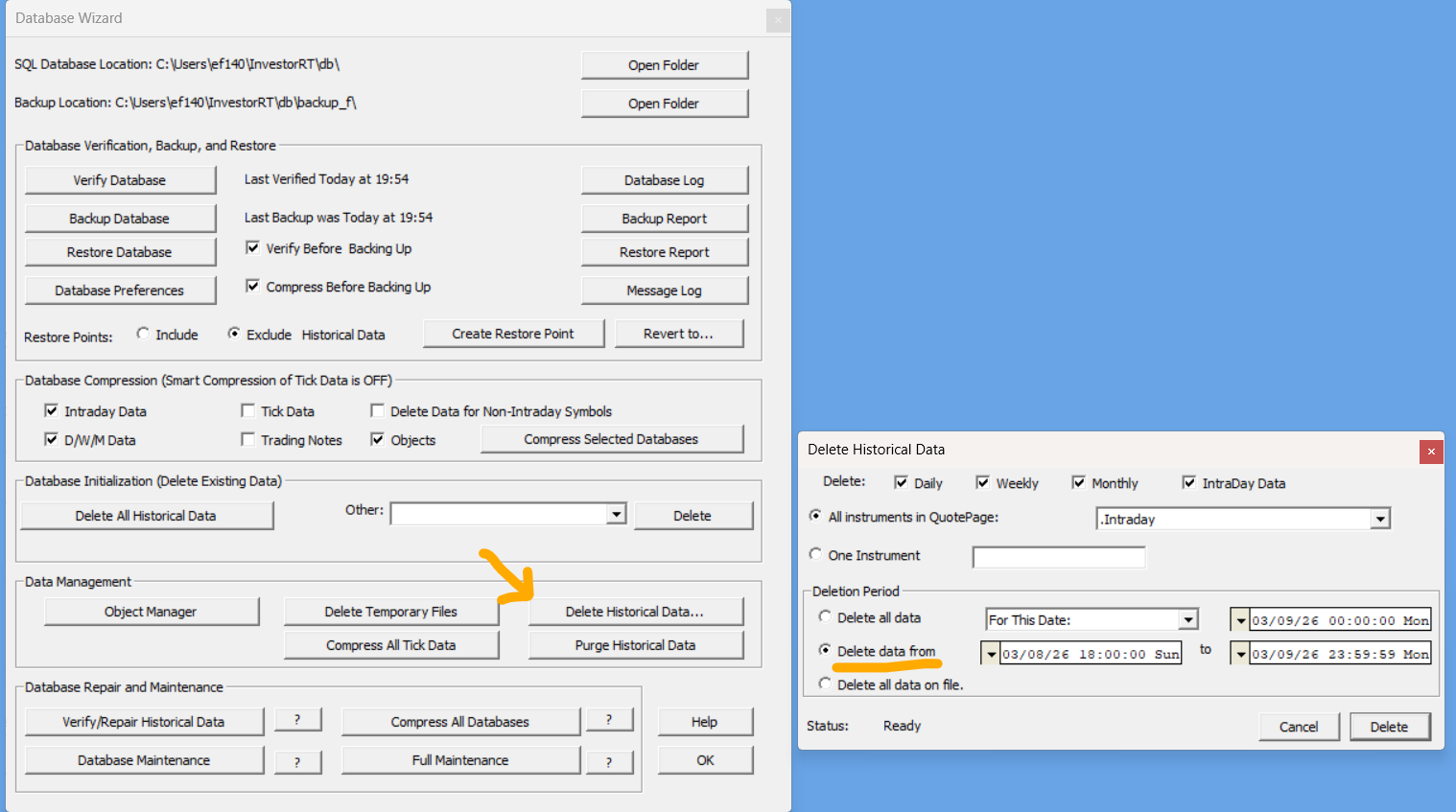
This can be done by using the "Delete Historical Data" option in the Data Management section of the "Data > Database wizard" menu (see screeshot below)
Select the option "Delete Data from" and select the period with incorrect data (typically starting on March 8th market open at 6pm Eastern). A safer option is "delete all data" for a given instrument or group of instrument (or to directly perform a full data download).
Then fully exit the application
3rd step) Restart Investor/RT. The Auto backfill feature should then fill any missing data with the right time stamp.
Method B
if you have a recent restore point file, an alternative (and even simpler) way to proceed is as follow:
a) Shutdown I/RT - download the most recent holidays.txt file and replace the current file
b) Restart I/RT and Revert to this restore point file (typically created last week, before the DST switch on Sunday)
c) The autobackfill feature will then download the required missing data to fill any gap
Contact us if you face any issue with this process
Please note that Investor/RT 16.1 beta release users are not impacted by this issue.
Reminder: The Daylight Saving Time support webpage is located here. This is mainly of concern for US based users trading EU markets or European traders dealing with US futures)
Best regards,
Linn Software Support Team