Home                           

 Try Investor/RT             

 Investor/RT Tour           

 Getting Started              

 What's New                  

 Testimonials                 

  Q&A - Broken down by Topic . . .      Complete List of Questions - All Topics
     Charts and Technical Indicators      Market Profile Charts
     RTL: Scans, Signals, and Custom Indicators      Importing and Exporting
     Trading Systems and Backtesting      Schedules
     Quotepages, Portfolios and Custom Columns      Alarms / Alerts
     Data: Historical Data, the Database, and Data Services      User Variables (T# and V#)
     Custom Instruments: Spreads and Pairs      General / Miscellaneous
     Controls, Windows, and the Button Indicator      Autotrading
     Slide Shows      Product Line

 
Q&A Home

Investor/RT Answer
Answers to Common Questions


Question

Where can I find the Cumulative Delta study in Investor/RT?
   

Answer

Also See: Videos on Cumulative Delta Bars
Also See: Volume Breakdown Comprehensive Overview

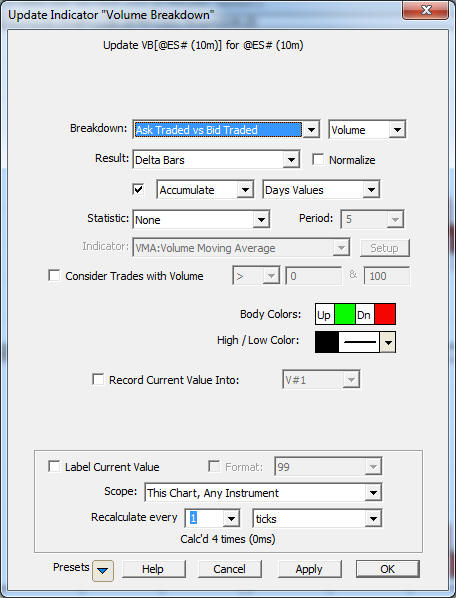
The Cumulative Delta is an option within the Volume Breakdown Indicator (VB).  The most common VB setting for cumulative delta is to accumulate the days/sessions values and draw as "Delta Bars" as seen below.
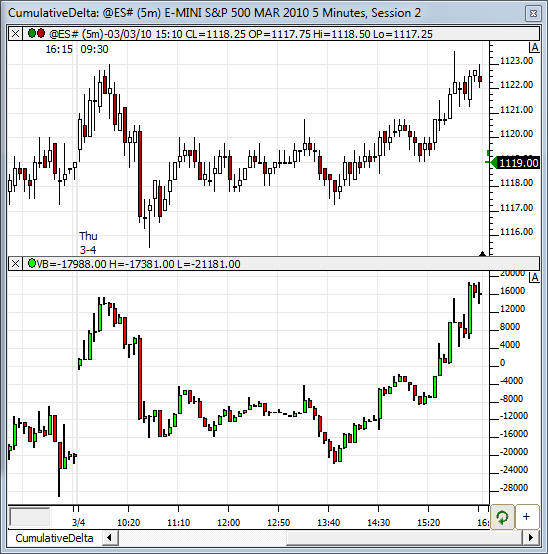
The result is a set of candlesticks representing the cumulative delta for the session, building from zero at the start of each session, as seen in the bottom pane of the chart below.

Some users prefer to accumulate all data instead of resetting the delta calculation to zero at the start of each session.  For those that accumulate all data, this video on plotting lines between bars will be useful as it shows how to snap those lines to the highs or lows of the VB candles.