

BackTesting
BackTesting refers to the actual execution of a Trading System on a security, or set of securities over a given period of time.
Custom Indicator
Custom Indicator A Custom Indicator is just that. It is an indicator which you customize to meet the criteria you are searching for. Once you've composed the expression for you Custom Indicator, you can add the Custom Indicator to any chart just as you can any other technical indicator. See Custom Indicator
Default
Default basically refers to characteristics that something will initially inheit when it is first created. For example, if you were create a new document in a word processor such as Microsoft Word, and you chose "File:New". That the blank document that results actually has several default characteristics, such as a white background, a 12 point Times New Roman font, a black text color. As you work on this document, you can of course override these defaults, but those are the characteristics you will get initially, because they are generally the most popular. Default properties work the same way in Investor/RT, and most can be set in Setup Preferences. For instance, you may choose for all QuotePages to have green background color and text that is red in a font of 10 point Comic Sans. Then all new QuotePages created from that point forward will inherit those default properties, which can then be altered.
Instrument
In Investor/RT, the term Instrument can be used interchangeable with the terms Ticker Symbol or Security. An instrument may be a stock, a future, an option, or even a custom (user-defined) instrument, etc. From Investor/RT's standpoint, an instrument is anything on which it collects and retains historical data.
Intraday
In Investor/RT, Intraday generally refers to any time period which is less than one day. For instance, 1 minute, 5 minute, tick, 30 minute, etc. Intraday is generally used in comparison with Daily, most notably when choosing Monitoring Options for a symbol. If you have chosen to monitor a symbol Intraday, then Investor/RT is going to maintain every tick (trade) that comes in on that symbol. If you have only chosen to monitor the symbol on a Daily basis, then Investor/RT is simply going to inspect the tick (trade), update prices in any open charts, quotepages, portfolios, etc., and then discard the tick. This options will minimize database size but will not be conducive to Intraday analysis of your symbol, such as viewing 1 minute charts, TPO Profile Charts, or Raw Tick Charts. See Data Retention Symbol Monitoring Options
Periodicity
Periodicity is used to explain the amount of time, or number of ticks, used to create each bar. If the periodicity is "Daily", then each bar represents the prices realized during a complete day or session. If the periodicity is "5 minute", then each bar represent a 5 minute period. If the periodicity is "12 ticks", then each bar is independent of time, and rather represents the prices realized over a 12 tick period.
Qualified
This is a term used when referring to the data elements which can be used to compose scans, signals, or custom indicators. Certain elements may be qualified with a whole number. The number represents the number of bars in the past. For instance, if your syntax stated: OP > HI2, then for each bar, it would check to see if the opening price of that bar is greater than the high price of the bar that is two bars back. The blue scan markers mark the bars where this condition is true. The condition is false for the other bars. 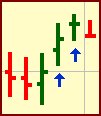
Quotepage
Quotepages are spreadsheets within Investor/RT. Each row in the quotepage represents a symbol. Each column represents some characteristic of each symbol. The quotepage can be sorted by columns. Each quotepage can have up to 30 columns, and each column can be create from a list of over 100 distinct market data items. Columns can be rearranged by dragging and dropping. Quote Pages 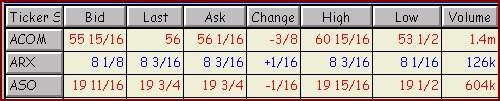
Scan
A scan is a tool in Investor/RT which allows you to search your database for certain criteria specified in your scan expression. A scan may be run on any quotepage using any periodicity. The result of the scan is a quotepage representing the symbols which successfully passed the specified criteria. See Scans
Sessions
Daily range or time in which a security is traded. For instance, 8:30 AM to 4:00 PM.
System QuotePages
A QuotePage that comes pre-packaged in Investor/RT. These quotepages are automatically maintained by Investor/RT in order to keep track of certain subsets of symbols. For instance, the .All Stocks quotepage keeps up with all the securities which are marked as being stocks in the system. System QuotePages all begin with a period '.'
Token
Token is a synonym for data element, and is used in the context of a scan, trading signal, or custom indicator. Tokens, or data elements, represent the components used to compose scans, trading signals, or custom indicators. For instance, HI, MA, ADX, and OI would all be tokens. RTL Language
Toolbar
Investor/RT provides toolbars to help you access the many powerful features accessible to different windows. The main toolbar always resides across the top of Investor/RT which gives you access to general functions. When you click on each window, a toolbar will appear giving you access to functions relevant to that window.
Trading Rule
Trading Rules are the building blocks of Trading Systems. Each rule is composed of a Trading Signal and an associated action such as buy, sell, sell short, etc.
Trading Signal
A Trading Signal is simply an expression which evaluates to a true or false result. Trading Signals are used to build Trading Rules, which in turn are components of Trading Systems (BackTests).
Trading System
A Trading System is a series of Trading Rules. See Trading System Tools
Watch Count
Number of ticker symbols which are being monitored tick-by-tick. If a symbol is being watched, it is counting towards your data feed symbol limit, if there is one. A symbol is being watched if it is either.... - Marked for Intraday - Displayed in any open chart - Present in any open QuotePage, Portfolio, Custom Profile target QuotePage, or Quick Quote Window
Window Pane
A Window Pane is an expression used to describe sub windows within charts.