tips

Tips - An Efficient Investor/RT

When you first installed Investor/RT, it was lean and mean, but after a year or two of use, dozens of imported charts, tinkering with 100s of settings, all while volume increased 5-fold, things have become sluggish. It's always good to pause and review your setup from time to time. A minor adjustment can make a world of difference.
A more efficient Investor/RT

Tips - Current Price Indicator

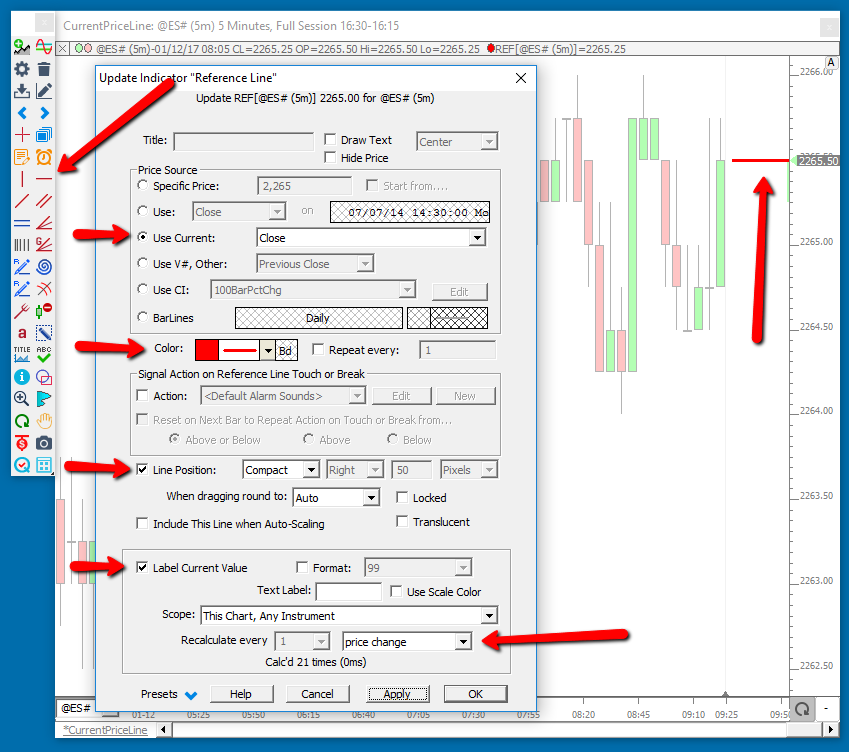
This tip explains how to use some new options on the Reference Line indicator to produce a nice dynamic current price text representation on your charts.

First, use the Reference Line Tool on the chart toolbar to add a reference line to your chart (anywhere will do for now). Then double click on the line to bring up the Reference Line Preferences. Now, make sure you have the following checkboxes checked...

Getting Started Setting Preferences

In the main toolbar, you will see the Setup Prefs setupPrefs button. When you click on this button, you will see a list of Preferences Windows available. This long list is an indicator of the flexibility which Investor/RT provides the user. Investor/RT is installed with reasonable defaults.
Pages