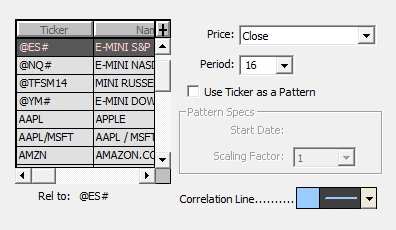
The correlation coefficient indicator compares price data series for 2 instruments. This calculation method is also available through the Divergence RTX indicator, which lets the user measure the linear correlation between any 2 data series, including instruments and/or custom indicators.
The Correlation Coefficient Indicator can be used in 2 different configurations
1) Plain computation of the correlation coefficient between the price data series of 2 instruments
In this case, the indicator compares the price-related data series of 2 instruments. When it comes to developing trading signals or strategies using the COR indicator, please note that the most frequently used input for the indicator is "CL-CL.1" rather than the absolute price (CL) because correlation of price levels is dominated by the common trend and stays near +1 most of the time, while correlation of bar-to-bar changes measures whether the two instruments really move together on each bar, which makes it more sensitive to divergence and more useful for signals. Since the correlation coefficient does not depend on scale, CL-CL.1 in points works the same as a per cent change for this purpose, so there is no need to convert both symbols into a common unit.
The correlation coefficient is a statistic used to measure the goodness of fit of two series of data points. The coefficient ranges in value between 1 and -1. A value of 1 represents a perfect correlation, while a value of -1 represents an inverted correlation. A value of zero represents no correlation at all. The correlation coefficient is a normalized indicator, meaning the actual values of the price or pattern data are not important, only the shapes of the patterns and charts.
For example, if you wanted to see how closely several Nasdaq stocks correlated with the Nasdaq Index itself, First, you would open a traditional daily (or intraday time-based) chart on one of the symbols you are interested in. Now, click the "Add Technical Indicator" button in the charting toolbar, and then choose "Correlation Coefficient" as the indicator. In the list on the left, choose the ticker for the Nasdaq Index ($COMPX in my case). For price, we'll choose "Close", and for period, we'll choose "10". These are up to you, but this way, we'll correlate the last 10 closing prices for the two instruments. Finally, choose a line color, style, and thickness using the color control, and click "OK". Your resulting line now shows you, for each day, how closely the two instruments correlated based on the prior 10 days. Again, 1 means perfect correlation while zero means no correlation. The correlation coefficient works equally well with periodicities such as 1-minute, 3-minute, weekly, etc. Just keep in mind that you need data on both instruments in order for this indicator to function. You may now simply switch the instrument in the chart to another Nasdaq stock to quickly see how well others correlated with the Nasdaq Index.
Note: the COR indicator is rarely used alone. Typical trading strategies target a specific market configuration characterized by a COR value together with a Relative Strength (RS) reading, and the Alpha/Beta indicator may also be involved, as each indicator answers a different question: COR shows whether the two instruments are moving together, RS shows which instrument is moving more strongly, and Beta shows how much of that stronger movement is only the normal result of one instrument being more volatile than the other. For example, with NQ and ES, a high COR together with a rising RS on NQ can indicate that NQ is leading the move, while a drop in COR combined with an RS reversal at a key price level can indicate that the move is not confirmed by the other instrument.
2) Chart pattern detection mode (legacy feature / daily periodicity only)
The original implementation of the correlation coefficient also included a very basic way to detect specific chart patterns on a daily chart. Please note that there are simpler ways to detect chart patterns today, such as using the zigzag indicator. However, this method, which requires the creation of a custom symbol (as the reference for the chart pattern to be detected) is still detailed below
To activate this mode, check the "Use ticker as A Pattern" box. The principle is to use a custom instrument (as the second instrument) with manually introduced quotes that simulate an ideal pattern (such as a Head and Shoulders pattern spreading over 20 days). The output value of the correlation coefficient then reflects how closely the previous 20 bars of your tested instrument correlate with that specified pattern
Let's say you have created a custom symbol called "HDNSLD" (for head and shoulders) and have imported 20 daily bars beginning 01/16/01. The closing prices of these daily bars represent your pattern's prices. In the indicator preferences, you would then choose HDNSLD from the list of instruments on the left, choose "01/16/01" as the Start Date, and choose "20" as the period. You also must check the "Use Ticker as Pattern" checkbox. For now, just choose a Scaling Factor of 1. Click "OK". The resulting indicator line shows how closely your pattern correlated with the actual price data based on the previous 20 bars at each data point. The Scaling Factor lets you stretch or compress your pattern. For instance, if you wanted to stretch your head and shoulder pattern out over twice as many bars (40), you would specify 2 as your Scaling Factor. Similarly, if you would like to compact your pattern to only span 1/3 as many bars, you would specify 1/3 as your Scaling Factor. The scaling factor and starting dates are only relevant when you are using a ticker as a pattern, not when you are correlating two instruments completely.
Presentation
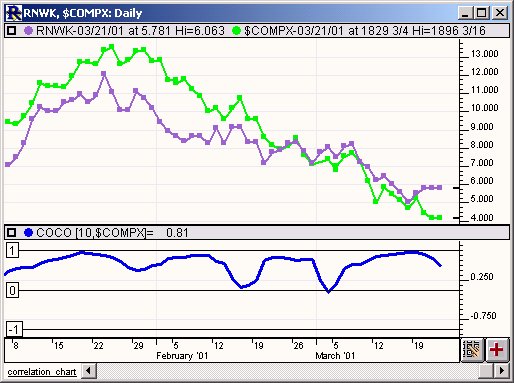
Above is a Daily Line Chart of Real Networks (RNWK - Purple) and Nasdaq ($COMPX - Green). The bold blue line in the lower window pane represents the Correlation Coefficient. Horizontal reference lines are automatically draw at -1, 0, and 1.