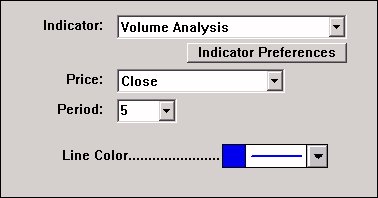
The IWA is a moving average that is weighted using another indicator. The weighting can be based on any of the built-in indicators in Investor/RT or any user-defined custom indicators written in RTL. The IWA gives the user control over the period, the price data to be weight-averaged (close, high, low, open, hi +lo/2, ohlc/4, etc.), and the indicator used to weight the data. When you choose a weighting indicator, you specify the preferences relevant to that indicator. The IWA makes it easy to code weighted average indicators such as the VWAP. For the example above, we show the VWAP. First, click on the “Add Technical Indicator” button in the charting toolbar and add the IWA indicator to your chart with the preferences shown above…
As seen above, the Volume Analysis Indicator was chosen as the weighting factor. Click on the “Indicator Preferences” button and specify the settings for the volume analysis. In this example, specify a smoothing period of one so that raw volume data will be used in weighting the price data. Specify a higher smoothing period if you want to weight using a smoothed volume average.
The raw volume will be used to weight the closing price data and average it over a 5-period span. The chart above shows the Volume-Weighted average (VWAP) in blue. The Volume indicator themselves has been added to the lower windowpane.
The chart above is a daily chart, but the IWA can be used in charts of any intra-day periodicity as well. Using IWA, Investor/RT users can develop an unlimited array of weighted moving averages and use them in scans, charts, trading signals, and backtests.
Presentation
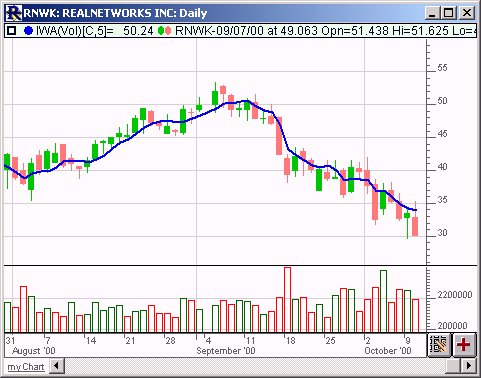
Above is a Daily Candlestick Chart of Real Networks (RNWK). The bold blue line represents a 5 Period Volume Weighted Average of the closing price. The volume analysis is show in the lower window pane of the chart.