PNF (Point And Figure Indicator)
The Point and Figure Indicator calculates columns just like the Point And Figure Charts. There are however a couple of advantages to being able to add PNF as an indicator on a chart. First, you can overlay the traditional bar data on top of the PNF data to see exactly where in time the reversals occurred and the amount of time that was spent in each column. Also, this provides the ability to apply all other technical indicators to PNF data, such as moving averages, reference lines, etc.
Presentation
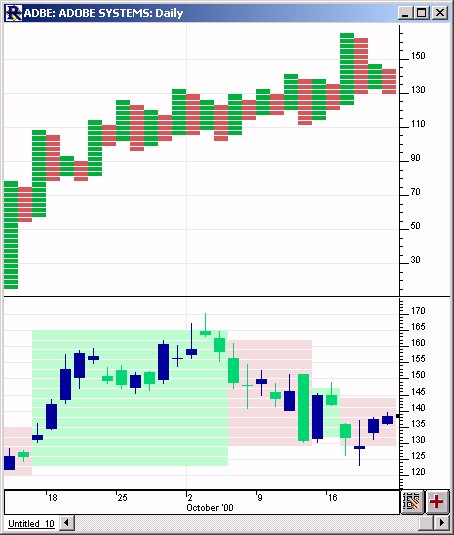
Above is a Daily Candlestick Chart of Adobe (ADBE). The upper pane shows a PNF Indicator with the preferences below specified. Each green block represents an 'X', and each red block represents and 'O'. The lower pane shows the price data overlaid with a time-based PNF Indicator.
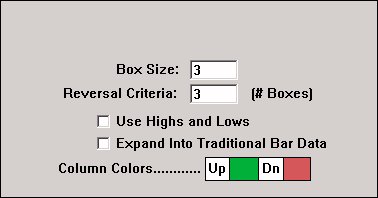
- Box Size -Size of the PNF Boxes.
- Reversal Criteria -Number of boxes needed to cause a reversal.
- Use Highs and Lows -Specifies whether to use only the closing prices of the bar data, or to use the highs, lows, and closing prices. .
- Expand Into Traditional Bar Data -This option cause the PNF columns to be expanded or stretched in order to conform with the underlying time-based traditional bar data. If this option is left unchecked, then the PNF indicator columns will not necessarily match up with the traditional bars. The feedback in the title bar will indicate the time or date that each PNF column ended. Checking this box will cause each PNF column to be stretched out over the period of time which was used to create the column. For instance, in the chart above, you can see that the first green up column lasted 15 days or bars before a reversal occurred.
No examples. Let us know if you'd like to see one added.
|
Pop-up Video |
Description |
View |
 |
This video explains how point and figure bars are formed and why volume is often missing at the... |
Watch |

