|

MASTER INDEX
SEARCH
CHARTS
MAIN TOOLBAR
SETTING PREFERENCES
TECHNICAL
INDICATORS
WHAT'S NEW
ALARMS
BACKTESTING
CONFIRMING TRADES
CUSTOM
COLUMNS
CUSTOM
INDICATORS
CUSTOM
INSTRUMENTS
CUSTOM PRICES
DATA FEEDS
DATABASE
DOWNLOADING
DATA
FEED STATUS
HEARTBEAT
HELP
MULTI-LINKING
MULTI-PERIODICITY
INSTRUMENT SETUP
NASDAQ LEVEL II
NEWS TICKER
NEWS BROWSER
OPTIMIZATION
OPTIONS
ANALYTICS
PLACING TRADES
PORTFOLIOS
PRESETS
PRINTING
QUICK
QUOTES
QUOTE PAGES
REALIZATION
RTL LANGUAGE
SCANS
SCHEDULES
SCOPE
SYSTEM STATUS
TICKER
TAPE
TIME AND SALES
TRADING NOTES
USER VARIABLES
VERTICAL SCALE
MASTER INDEX
DICTIONARY
FEEDBACK
|
Investor/RT Tour
( more on Technical
Indicators )
Renko
Indicator
| The Formula
. . . |
. . .more
on Formulas |
See Also:
Renko Charts
|
| |
| The
Presentation . . . |
. . . more
on Charts |
|

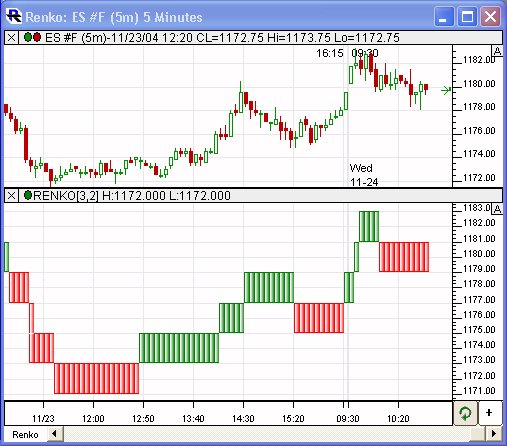
Above is a 5-minute Candlestick Chart of the S&P
E-mini (ES #F).
The lower pane shows a Renko Indicator with the preferences below
specified. Each green block represents an 'X', and each red
block represents and 'O'. |
| |
| The
Preferences . . . |
. . . more
on Preferences |
|

|
-
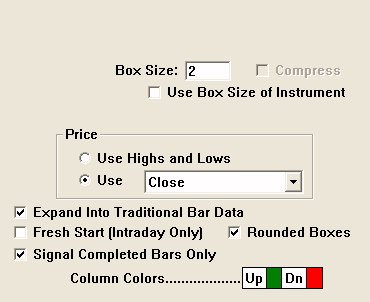
Box Size - Size
of the PNF Boxes.
-
Reversal Criteria
- Number of boxes needed to cause a reversal.
-
Use Highs and Lows
- Specifies whether to use only the closing prices of the
bar data, or to use the highs, lows, and closing prices.
For more information on data processing, click here.
-
Expand Into Traditional
Bar Data - This option cause the PNF columns to
be expanded or stretched in order to conform with the underlying
time-based traditional bar data. If this option is left
unchecked, then the PNF indicator columns will not necessarily
match up with the traditional bars. The feedback in the
title bar will indicate the time or date that each PNF column
ended. Checking this box will cause each PNF column to be
stretched out over the period of time which was used to create
the column. For instance, in the chart above, you can see
that the first green up column lasted 15 days or bars before a
reversal occurred.
-
Rounded Boxes - If this option is
checked, the boxes will be formed and rounded using multiples of
box size, starting at zero. If this option is unchecked, the
first box will be created at precisely the first price that is
processed. For example, assume the box size is 1.00. If
"Rounded Boxes" is checked, then boxes will be placed at prices
1.00, 2.00, ..., 51.00, 52.00, etc. This is how Investor/RT has
worked prior to this release. On the other hand, if "Rounded
Boxes" is unchecked, and the first price processed (opening
price) is 58.26, then the first box will appear at 58.26, and
subsequent boxes will form at prices like 59.26, 60.26, 57.26,
etc. Using the "Rounded Boxes" option can give your chart a
cleaner look and feel, but sacrifices a small amount of
precision at the very start.
|
| |
| The
Description . . . |
|
A Renko Indicator has been added for use in
traditional charts. It provides a way for the Renko boxes to be viewed
and stretched across a time based chart. This allows the user to see
exactly which bars were used to create each Renko box. Renko Charts
are essentially PNF charts with a reversal criteria of 1, and with
each box drawn in a separate column (while PNF draws X and O letters
instead of boxes, and stacks them vertically). RENKO is also available
in the RTL language for use in scans, trading signals, and custom
indicators. |
|