Home                           

 Try Investor/RT             

 Investor/RT Tour           

 Getting Started              

 What's New                  

 Testimonials                 


MASTER INDEX
  SEARCH
  CHARTS
  MAIN TOOLBAR
  SETTING PREFERENCES
  TECHNICAL INDICATORS
 
WHAT'S NEW
  ALARMS
  BACKTESTING

  CONFIRMING TRADES
  CUSTOM COLUMNS
  CUSTOM INDICATORS
  CUSTOM INSTRUMENTS
  CUSTOM PRICES
  DATA FEEDS
  DATABASE
  DOWNLOADING DATA
  FEED STATUS
  HEARTBEAT
  HELP
  MULTI-LINKING
  MULTI-PERIODICITY
 
INSTRUMENT SETUP
 
NASDAQ LEVEL II
 
NEWS TICKER
 
NEWS BROWSER
  OPTIMIZATION
  OPTIONS ANALYTICS

  PLACING TRADES
  PORTFOLIOS
  PRESETS
 
PRINTING
  QUICK QUOTES
  QUOTE PAGES
  REALIZATION
  RTL LANGUAGE
  SCANS
  SCHEDULES

  SCOPE
  SYSTEM STATUS
  TICKER TAPE
  TIME AND SALES

 
TRADING NOTES
  USER VARIABLES
  VERTICAL SCALE
MASTER INDEX
DICTIONARY
FEEDBACK

Investor/RT Tour ( more on Technical Indicators )
Automatic Trendlines
The Formula . . . 

. . .more on Formulas 

UpTrend Line:  connects the lowest low in the user specified period with the next lowest low preceding without penetrating any of the other bars in the period.
DownTrend Line: connects the highest high in the user specified period with the next highest high preceding without penetrating any of the other bars in the period.

Classic Mode
UpTrend Line
:  connects the lowest low in the user specified period with the next lowest low preceding the highest high for which the trend line is not penetrated.
DownTrend Line
: connects the highest high in the user specified period with the next highest high preceding the lowest low for which the down trend line is not penetrated.

The Presentation . . . 

. . . more on Charts 

Auto Trendline

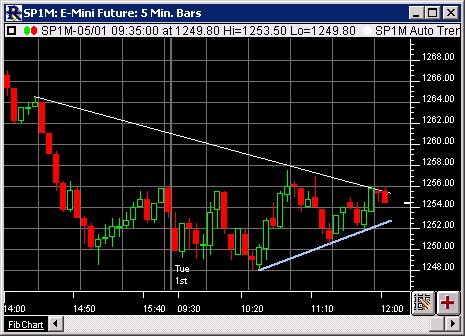
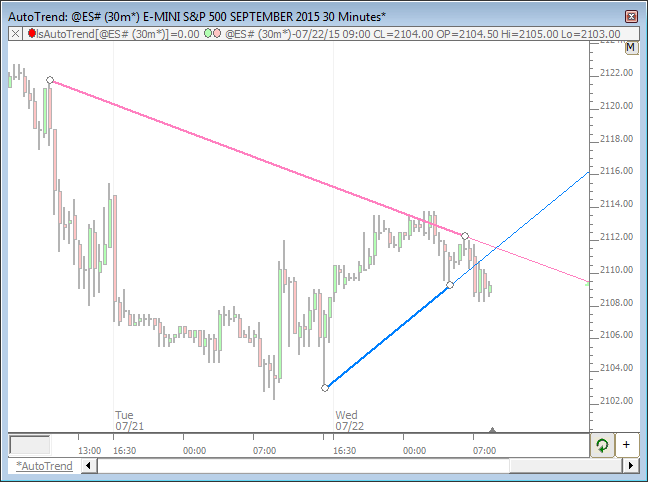
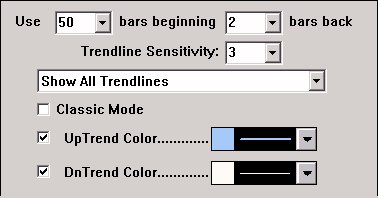
Above is a 5 Minute Candlestick Chart of the S&P 500 Future Contract (SP1M).  The uptrend line can be seen in green, with the downtrend line in red.  The trendline is based on a period of 100 as seen in the preferences below.  Refer the the description at the bottom of this page for further details on how the trendlines are determined. 
 
The Preferences . . . 

. . . more on Preferences 

Auto Trendline Preferences

  • Use X bars -Number of bars to use when determining the trendline(s).

  • beginning X bars back - Number of bars back to begin consideration for the trendline.  This allows the user to have the most recent X bars ignored when determining the trendline

  • Trendline Sensitivity -Minimum number of bars separating the bars which form a trendline.

  • Show ___ Trendlines - The user may choose to either "Show All Trendlines", "Show Steepest Trendline", "Show Flattest Trendline", "Show Longest Trendline", or "Show Shortest Trendlines". 

  • Classic Mode - Determines the trendlines based on the rules specified in the formula above. 

  • - Dictates whether or not to draw the up or down trendlines.

  • UpTrend Color - Color and size of the uptrend line.

  • DnTrend Color - Color and size of the downtrend line.

 
The Description . . .
The automatic trend line indicator determines the current up trend and down trend line and draws them. Trend lines may also be drawn manually using the drawing tool on the charting toolbar, but this indicator does it automatically. The user specifies the number of periods to "look back" from the present to determine where to place the trend lines. 

The up trend line connect the lowest low in the user specified period with the next lowest low preceding the highest high for which the trend line is not penetrated.


The down trend line connects the highest high in the period with the next highest high preceding the lowest low for which the down trend line is not penetrated. 

The user may specify the colors and whether to draw either the up, the down trend, or both. 

In some cases, depending on the historical pricing of a particular issue, there may not be a valid up or down trend for the user specified period. 

This indicator can be applied multiple times to the same chart window. For example, in a daily chart, you could add auto trend lines for periods of 500, 250, and 60, to see long term, intermediate term and short term trends in your charts. 

Auto trend lines are especially useful in slide shows. As the slide show advances from one issue to the next, the current trend lines for the issues are calculated and drawn automatically. This is not possible with manually drawn trend lines.

RTL - TLU and TLD - Auto Uptrend (TLU) and Auto Downtrend (TLD) tokens have been added to the RTL language. The value of these tokens will represent the value of the steepest automated trendline at the current bar. Each token uses the preferences of the Automatic Trendline indicator. These tokens can be helpful in finding instruments that may be breaking through the trend. For instance, you may run the following scan...

CL <= TLU OR CL >= TLD

...to find instrument that have either broken above the auto-downtrend or broken below the auto-uptrend.