|

MASTER INDEX
SEARCH
CHARTS
MAIN TOOLBAR
SETTING PREFERENCES
TECHNICAL
INDICATORS
WHAT'S NEW
ALARMS
BACKTESTING
CONFIRMING TRADES
CUSTOM
COLUMNS
CUSTOM
INDICATORS
CUSTOM
INSTRUMENTS
CUSTOM PRICES
DATA FEEDS
DATABASE
DOWNLOADING
DATA
FEED STATUS
HEARTBEAT
HELP
MULTI-LINKING
MULTI-PERIODICITY
INSTRUMENT SETUP
NASDAQ LEVEL II
NEWS TICKER
NEWS BROWSER
OPTIMIZATION
OPTIONS
ANALYTICS
PLACING TRADES
PORTFOLIOS
PRESETS
PRINTING
QUICK
QUOTES
QUOTE PAGES
REALIZATION
RTL LANGUAGE
SCANS
SCHEDULES
SCOPE
SYSTEM STATUS
TICKER
TAPE
TIME AND SALES
TRADING NOTES
USER VARIABLES
VERTICAL SCALE
MASTER INDEX
DICTIONARY
FEEDBACK
|
Investor/RT Tour
( more on Technical
Indicators )
Bar Lines
Built within Reference Line tool
| The Formula
. . . |
. . .more
on Formulas |
| NA |
| |
| The
Presentation . . . |
. . . more
on Charts |
|

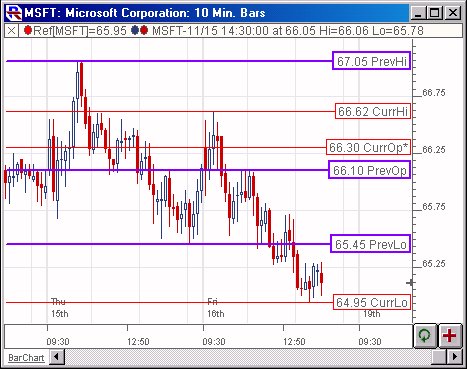
Above is a 10-minute chart of the Microsoft (MSFT).
The BarLines are drawn as horizontal reference lines in red and
blue. The blue lines represent the High, Low, and Open of the
previous day, while the red lines represent the High, Low, and Open
of the current day. |
| |
| The
Preferences . . . |
. . . more
on Preferences |
|
 |
-
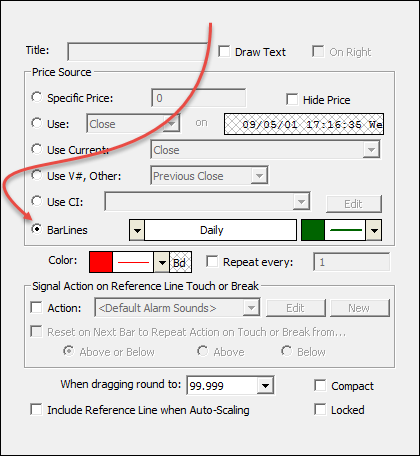
BarLines- This
turns on the BarLines option inside the Reference Line tool.
This results in 6 lines, at the High, Low, and Open of the
current and previous day. The lines for the current high
and low are dynamic. The previous lines will be drawn in
the color right of the bar lines, while the current lines will
be drawn in the color at the bottom of the dialog.
Actually, the BarLines aren't limited to daily
periodicity. Any periodicity may be specified. For
instance, if 60-minutes is chosen as the periodicity, then the
current lines will draw at the high, low, and open of the
current 60-minute bar, while the previous lines will draw at the
high, low, and open of the previous 60-minute bar.
IMPORTANT NOTE: If your
chart is an intraday chart, and you want the BarLines to reflect
daily values, AND to reflect the SESSION OVERRIDE that
you've assigned to that chart (for instance, your symbol may be
set to the 24 hr session 31, while the chart is set to the RTH
session 2), then just setup the BarLines with a periodicity of
"1000 minutes" (instead of daily). This will result in
BarLines reflecting the RTH daily values. If you specify a
periodicity of "Daily" for the BarLines, then the daily bars on
the database will be used (those seen in a daily bar chart), and
that is not always what is desired by the user. This will
only work for overriding sessions which span 1000 minutes or
less (session 0 spans 390 minutes, session 2 spans 405 minutes,
but session 31 spans 1425 minutes and there are 1440 minutes in
a day).
|
| |
|
The
Description . . . |
| The Horizontal Reference line tool has
been enhanced with a new option entitled "Bar Lines". This
option gives the user an automated tool that draws horizontal
reference lines at 6 levels: current open, current high, current
low, previous open, previous high, previous low. This option comes
with a periodicity control that dictates the periodicity of the bars
used to determine the current and previous levels. For instance, if
you specify a periodicity of "Daily", then your previous
open will be the open of the previous day, and your current high
will be the high of today. If you specify a periodicity of 30
minutes, then your previous low will be the low of the previous 30
minute bar, while your current open will be the open of the current
30 minute bar. Each horizontal reference line is labeled with a
description and value. (eg. 33.75 PrevOp) This option also comes
with an additional color, allowing the user to specify different
color for current versus previous lines.
|
|
|
|