| The Formula
. . . |
. . .more
on Formulas |
Ergodic = TSI
Ergodic Signal Line = EMA(TSI)
Ergodic Oscillator = TSI - EMA(TSI)By default,
TSI is setup with a Short Term of 5 and a Long Term of 20 and EMA
is setup with a period of 5. |
| |
| The
Presentation . . . |
. . . more
on Charts |
|
 |
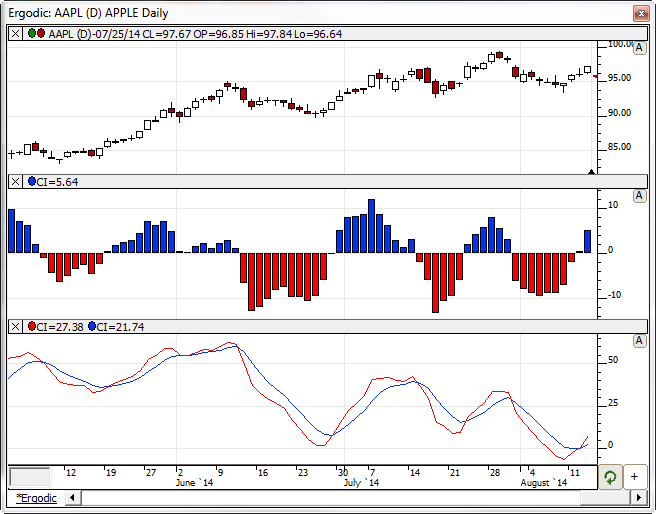
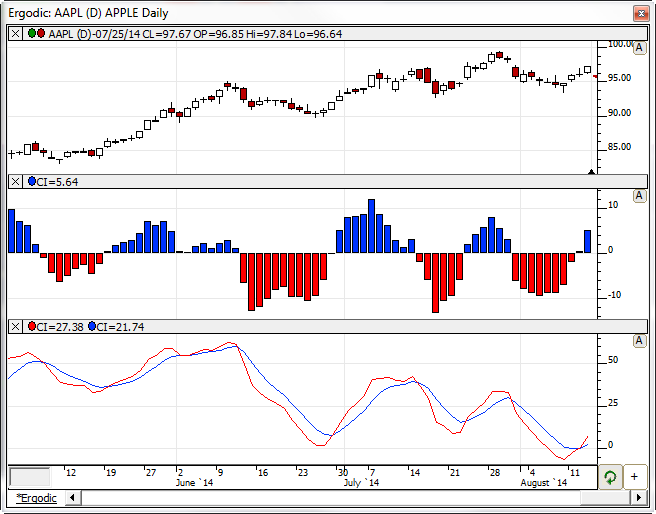
| The chart above is a daily candlestick
chart of INTC. The Ergodic Oscillator is chart in the second
pane as a histogram. The Ergodic (Red) and the Ergodic Signal
(Blue) lines are charted in the lower pane. |
| Chart
Definition . . . |
|
|
|
The Ergodic chart seen above can be downloaded and imported into
Investor/RT using the process below (Professional Version
Required):
- Right-click here and
choose "Save Target As".
- Select a location on your computer to save the Ergodic.txt
file (chart definition).
- From within Investor/RT, choose "File: Import: Chart
Definition".
- Locate and select the Ergodic.txt file you just saved to your
computer and then click "Open".
- The Ergodic chart should appear. The three custom
indicators (Ergodic, ErgodicSig, and ErgodicOsc) will also be
imported and appear in the chart.
- You may have to download data and/or switch symbols or
periodicity in order to properly view the indicators.
|
| |
|
The
Description . . . |
Trading Ergodics with the Trend - Rules
- Enter or hold position only when slope of Ergodic Signal line
has the same direction as the trend
- Stand aside when slope of Ergodic Signal Line is in the opposite
direction of trend
- Enter or exit position when Ergodic and its Signal Line cross
|
| |
|
RTL Token . . . ( more
) |
|
Use the token CI to reference any Custom Indicator.
|
|
Keyboard
Adjustment . . . |
| When any Custom Indicator is selected,
press the up or down arrow keys on your computer to directly access
the Custom Indicator definition window. For more information on technical
indicator adjustment, click here. |
|
User
Strategies . . . |
| |
|
|
|
| If you have a
strategy involving this indicator that you'd like to share, please
email support@linnsoft.com
|