|

MASTER INDEX
SEARCH
CHARTS
MAIN TOOLBAR
SETTING PREFERENCES
TECHNICAL
INDICATORS
WHAT'S NEW
ALARMS
BACKTESTING
CONFIRMING TRADES
CUSTOM
COLUMNS
CUSTOM
INDICATORS
CUSTOM
INSTRUMENTS
CUSTOM PRICES
DATA FEEDS
DATABASE
DOWNLOADING
DATA
FEED STATUS
HEARTBEAT
HELP
MULTI-LINKING
MULTI-PERIODICITY
INSTRUMENT SETUP
NASDAQ LEVEL II
NEWS TICKER
NEWS BROWSER
OPTIMIZATION
OPTIONS
ANALYTICS
PLACING TRADES
PORTFOLIOS
PRESETS
PRINTING
QUICK
QUOTES
QUOTE PAGES
REALIZATION
RTL LANGUAGE
SCANS
SCHEDULES
SCOPE
SYSTEM STATUS
TICKER
TAPE
TIME AND SALES
TRADING NOTES
USER VARIABLES
VERTICAL SCALE
MASTER INDEX
DICTIONARY
FEEDBACK
Indicator-A-Day
24.
Volume Breakdown
23. PriceTime
Cycles
22. Trend
Intensity Index
21. Bollinger
Bands
20. Balance
of Power
19. RSI
18. Fib
Retracements
17. Parabolic
SAR
16. CCI
15. ADXR
14. ADX
13. DI+
/ DI-
12. True
Range
11. Stochastics
10. Statistics
9. TLB
Oscillator
8.
Weighted
MA
7.
Exponential
MA
6. Moving
Average
5.
Regression
Review
4.
Reg
Acceleration
3.
Regression
Slope
2.
Regression
Bands
1.
Linear Regression
|
Investor/RT Tour
( more on Technical
Indicators )
Linear Regression Forecast
Linear Regression Bands
Linear Regression Oscillator
| The Formula
. . . |
. . .more
on Formulas |
SmoothPrice = MA(PRICE, Z)
where
Z = MA Period
(Note: If no smoothing is desired (just raw price), then an MA
Period of 1 should be specified. In this case, SmoothPrice
will be the same as PRICE.)
Regression Band = Reg(SmoothPrice , X) + Slope * Y
where
Z = MA Period
X = Regression Period
Y = Forecast Period (optional - can be 0)
Slope = Slope of regression line
Upper Band = Regression Band + StdDev(SmoothPrice, X) *
N
where
N = Standard Deviation(s)
X = Regression Period
Lower Band = Regression Band - StdDev(SmoothPrice, X) *
N
where
N = Standard Deviation(s)
X = Regression Period
Linear Regression Oscillator
= (Price - Regression Band) /
StdDev(SmoothPrice, X)
where
X = Regression Period
See Also...
...Linear Regression
...Linear Regression Slope
...Linear Regression
Acceleration
|
| |
| The
Presentation . . . |
. . . more
on Charts |
|

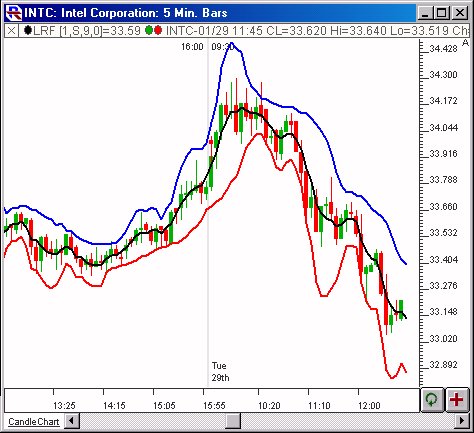
Above is a Daily Candlestick Chart of an Intel
Corporation (INTC). The Linear Regression Forecast (LRF) is
drawn in black, with an upper 2 standard deviation band drawn in
blue, and a lower band drawn in red. |
| |
| The
Preferences . . . |
. . . more
on Preferences |
|

|
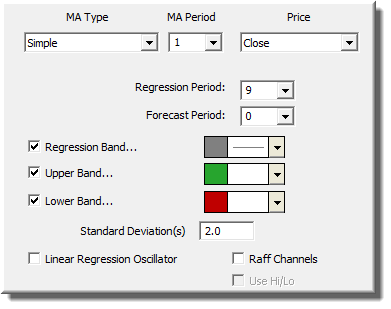
-
Price - Price
data to be used in computation.
-
MA Type
- Type of smoothing to be applied prior to regression.
-
MA Period - Smoothing
period to be used prior to regression.
-
Regression Period
- Number of bars to be used in computing the regression
line.
-
Forecast Period
- The middle regression band can optionally be forecast
into the future by a user specified number of bars. If the
forecast period is 0, no forecasting will occur. If the
forecast period is greater than 0, then the linear regression
line (computed using the regression line) is projected forward
to determine the regression value for that bar.
-
Regression Band
- Middle band, determined by computing a regression line
using current bar and previous X-1 bars (X being regression
period), and projecting that line forward by Y bars (Y being
forecast period), and then taking the endpoint of the line as
the value.
-
Upper Band - Standard
deviation band drawn above the regression line. Uses the
number of standard deviations specified below. The
standard deviation is computed over the regression period
specified.
-
Lower Band - Standard
deviation band below above the regression line. Uses the
number of standard deviations specified below. The
standard deviation is computed over the regression period
specified.
-
Standard Deviation(s)
- How many standard deviations from the middle regression
band that the upper and lower bands will be drawn.
-
Linear Regression
Oscillator - The Linear Regression Oscillator represents the number of standard deviations of current price from the linear regression line.
A more complete explanation can be found in the description
below.
|
| |
| The
Description . . . |
| The Linear Regression Forecast indicators
optionally smoothes the price data, performs a regression on the
result, forecasts the regression lines if desired, and then
optionally creates standard deviations bands above and below the
regression line. First, the data, based on the price
selected, is smoothed using the moving average period and
type. If you prefer no smoothing, choose a period of 1
here. The resulting data is then used to form regression lines
ending at each bar, using the regression period specified. The
values at each bar can optionally be forecasted values, determined
by projecting the regression lines X bars into the future, X being
the forecast period. If X=0, then no forecasting will
occur. Standard deviation bands can then be drawn above and
below the regression line, based on a number of standard deviations
(standard deviation multiple)
specified, and a standard deviation value computed using data in the the
regression period range.
The name of this indicator is somewhat misleading, as forecasting
is optional, and only a small part of what this indicator can
do. In its most basic form, with no smoothing (ma period of 1)
and no forecasting (forecast period of 0), LRF simply gives the
ending point of linear regression lines that ending at each bar, and
using the regression period provide. This option alone
provides a nice moving average substitute, and is actually identical
to the Least Square moving average type available in Investor/RT
(add both to your chart and see).
A smoothing (MA) period, caused the data to be pre-smoothed,
prior to performing any regression analysis or forecasting. A
forecast period takes the linear regression line ending at each
point, and projects it forward X number of bars, X being the
forecast period. This projected value is then used as the LRF
value for that bar.
The bands that are drawn use a standard deviation that changes
over time. The standard deviations are computed just as they
are for the Linear Regression study.
The standard deviation multiplier specified in the preferences is
multiplied by the standard deviation value to determine how far the
bands will be drawn from the base line. The Linear Regression
Oscillator represents the number of standard deviations of current price from the linear regression line. A value of 2 means that price is currently 2 standard deviations above the linear regression line (using the regression period specified...ending on that bar). A value of -1.5 means price is currently 1 1/2 standard deviations below the regression line. This options has been added as a "Linear Regression Oscillator" checkbox to the LRF indicator. When drawn, reference lines are automatically drawn at -2, -1, 0, 1, and 2 standard
deviations. It is recommended that the Linear Regression
Oscillator be drawn in a separate window pane from price data.
The Linear Regression Oscillator tells how far the current price has deviated from the regression trendline, in units of standard
deviations, or how far the price has deviated from the general trend established by the regression analysis (using period
specified).
|
| |
| RTL
Token . . . LRF ( more
) |
|
All three line values can be accessed in RTL using the LRF
token. To access the middle regression band, check only the
"Regression Band" checkbox (uncheck Upper and Lower Band). To access the upper
band, check only the "Upper Band" checkbox. To
access the lower band, check only the "Lower Band"
checkbox.
|
| Keyboard
Adjustment . . . |
| The periods involved in the LRF indicator
can be adjusted directly from they keyboard without opening up the
preference window. First, select the indicator, then use the
up and down arrow keys to adjust the regression period up or down by
1. To adjust the MA period, hold down the shift-key while
hitting the up and down arrows. To adjust the forecast period,
hold down the ctrl-key while hitting the up and down arrow
keys. For more information on technical
indicator adjustment, click here. |
| User
Strategies . . . |
| |
|
Steven Kessler |
02/22/02 |
| Chart
Example - E-Mini 1-minute with Linear Regression Bands |
I much prefer the LRF bands to Linear Regression bands because they stay put on the chart. I use a forecast of 0, a regression period of 100, and a MA
period of 1 (no pre-smoothing) on 1-, 2-, 3-, and 5-minute charts of the ES to show probable support and resistance levels, along with pivot points and the usual recent highs and lows and fib retracements. In a directionless market like today the
1-minute 2 std dev bands are quite useful.
|
|
Linn Software - Chad Payne |
02/22/02 |
| Chart
Example |
You can create a custom indicator that will actually show you how many standard deviations (from the linear regression line) that the current prices is. This indicator will be positive when price is above the regression line, and negative prices is below. The
screenshot
shows the custom indicator and an example of it in action, drawn as a histogram in the lower window pane.... Here is the syntax of the custom indicator...
(CL - LRF) / STAT
LRF is setup with no smoothing (period = 1), no forecasting (period = 0), and a regression period of 13.....only checkbox that is checked is Regression Band...
STAT is setup as standard deviation on close of last 13 periods....
A value of -2.3 tells you that prices is currently 2.3 standard deviations below the regression line (that begins 13 bars back and ends on that bar)....
|
|
Linn Software - Chad Payne |
02/22/02 |
| Chart
Example |
Here is an example of using the Custom Indicator (mentioned in last email) within a PaintBar using Linear Regression Bands (built
within the LRF)...
See screenshot.
This is a daily chart of MSFT... The bars are overlaid with LRF, using a period of 13, and 1.5 standard deviations. I have also added a Paint Bar indicator to the chart. The paint bar preferences
shown...and is based on the custom indicator shown. LRFU is just the LRF token renamed...with only the "upper" band check. LRFL is LRF renamed, with just the lower band check. As you can see, bars are draw in black when they close above the upper band, and drawn in blue when they close below the lower band..
|
|