Home                           

 Try Investor/RT             

 Investor/RT Tour           

 Getting Started              

 What's New                  

 Testimonials                 


MASTER INDEX
  SEARCH
  CHARTS
  MAIN TOOLBAR
  SETTING PREFERENCES
  TECHNICAL INDICATORS
 
WHAT'S NEW
  ALARMS
  BACKTESTING

  CONFIRMING TRADES
  CUSTOM COLUMNS
  CUSTOM INDICATORS
  CUSTOM INSTRUMENTS
  CUSTOM PRICES
  DATA FEEDS
  DATABASE
  DOWNLOADING DATA
  FEED STATUS
  HEARTBEAT
  HELP
  MULTI-LINKING
  MULTI-PERIODICITY
 
INSTRUMENT SETUP
 
NASDAQ LEVEL II
 
NEWS TICKER
 
NEWS BROWSER
  OPTIMIZATION
  OPTIONS ANALYTICS

  PLACING TRADES
  PORTFOLIOS
  PRESETS
 
PRINTING
  QUICK QUOTES
  QUOTE PAGES
  REALIZATION
  RTL LANGUAGE
  SCANS
  SCHEDULES

  SCOPE
  SYSTEM STATUS
  TICKER TAPE
  TIME AND SALES

 
TRADING NOTES
  USER VARIABLES
  VERTICAL SCALE
MASTER INDEX
DICTIONARY
FEEDBACK


Indicator-A-Day
 24. Volume Breakdown
 23. PriceTime Cycles
 22. Trend Intensity Index
 21.
Bollinger Bands
 20.
Balance of Power
 19. RSI
 18.
Fib Retracements
 17. Parabolic SAR
 16.
CCI
 15. ADXR
 14.
ADX
 13.
DI+ / DI-
 12.
True Range
 11.
Stochastics
 10. Statistics

   9. TLB Oscillator
   8. Weighted MA
   7. Exponential MA
   6. Moving Average
   5. Regression Review
   4. Reg Acceleration
   3. Regression Slope
   2. Regression Bands
   1. Linear Regression


Investor/RT Tour ( more on Technical Indicators )
Parabolic Stop And Reversal (SAR)
The Formula . . . 

. . .more on Formulas 

If Long...
SAR = (HI.1 - SAR.1) x AF + SAR.1

Wilder's acceleration factor (AF) is 0.02 for the initial calculation. Thereafter the AF is increased 0.02 every period there is a New High made. If a new high is not made then the AF is not increased from the last SAR. This continues until the AF reaches 0.2. Once the AF reaches 0.2 it stays at that value for all future SAR calculations until the trade is stopped out.

If Short...
SAR = (LO.1 - SAR.1) x AF - SAR.1

The AF is initially 0.02 and changes by 0.02 intervals until it is 0.2 but the change in the AF is made only after each New Low of a period is made. The AF is never increased above 0.2.

Rules of Advancement...
The SAR is never advanced into the previous period's range or the current period's range.

If Long using daily data: Never move tomorrows applicable SAR above yesterdays or today's low. If the calculated SAR is higher than either of these lows then use the lower low of these two days as the SAR and use this value for SAR calculation for the next day.

If Short using daily data: Never move the SAR below the high of yesterday or today. If the calculated SAR is lower than either of these values then use the higher high of these as the SAR for the day and for the future calculation for the following day's SAR.

 
The Presentation . . . 

. . . more on Charts 

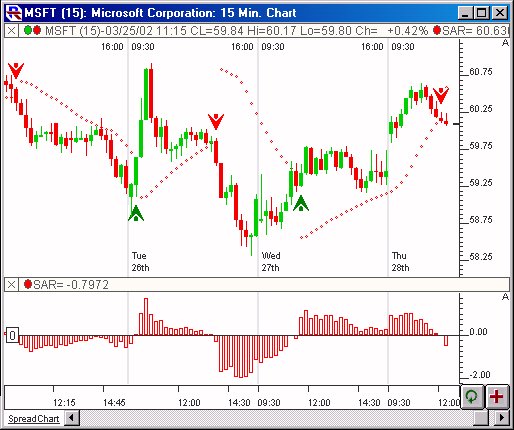
Above is a 15-Minute Candlestick Chart of Microsoft Corporation (MSFT) .  The red dots overlaying the candles represents the Parabolic SAR levels using the preferences below.  The green up arrows represent bullish SAR reversals, while the red down arrows represent bearish SAR reversals (both Scan Markers).  In the lower pane, the SAR is drawn as an oscillator.

 
The Preferences . . . 

. . . more on Preferences 

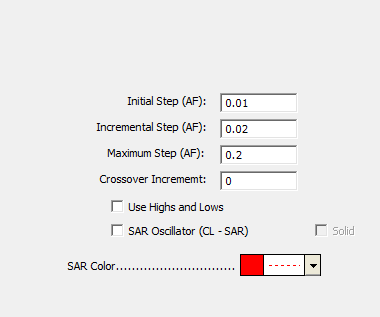
  • Initial/Incremental Step - The values used for initializing and stepping the acceleration factor (AF).

  • Maximum Step - The maximum value that can be used for the acceleration factor (AF).

  • Use Highs and Lows - If this checkbox is checked, the high and low values will be used in the computation of the SAR, otherwise, only the open and closing values will be considered.

  • SAR Color - Color and style of the SAR line/oscillator in the chart.

  • SAR Oscillator (CL - SAR) - This option results in a histogram style oscillator representing the difference between the closing price and the SAR value. 

 
The Description . . .
The Parabolic SAR, developed by Welles Wilder, is used to set trailing price stops.  SAR refers to "Stop-And-Reversal".  It is designed to create exit points for both long and short positions in such a way that it allows for reactions or fluctuations at the beginning of the position, but accelerates upward (for long positions) or downward (for short positions) as the movement tops out.

Parabolic SAR is plotted around the price chart similar to a  moving average. The basics behind the formula for computing the SAR values can be found above.

The Parabolic SAR provides excellent exit points. You should close long positions when the price falls below the SAR and close short positions when the price rises above the SAR.

If you are long (i.e., the price is above the SAR), the SAR will move up every day, regardless of the direction the price is moving. The amount the SAR moves up depends on the amount that prices move.

Wilder suggests using this indicator in a trending (or directional) market. If the security is trending up, then one might only take long positions. If the security is trending down, one might only take short positions.

SAR Oscillator
A new checkbox labeled "SAR Oscillator (CL - SAR)" has been added to the Parabolic SAR Indicator preferences.  When this option is checked, the oscillator will be drawn as a histogram that oscillates about 0.  The oscillator represents the difference between the closing price and the SAR indicator value. SAR rules would dictate entering into a long position when the oscillator crosses above 0, and reversing into a short position when the oscillator crosses below 0. 
 

Keyboard Adjustment . . .
(Available in 5.5.2 and later)
Keyboard adjustment can be very helpful when trying to visually optimize your indicator options.  Both steps (initial and maximum) involved in the SAR indicator can be adjusted directly from they keyboard without opening up the preference window.  First, select the indicator, then use the up and down arrow keys to adjust the Initial/Incremental Step up or down by 0.001.  To adjust the Maximum Step up or down by 0.01, hold down the shift-key while hitting the up and down arrows.   For more information on technical indicator adjustment, click here.
 
RTL Token . . . SAR ( more )
The RTL Token for the Parabolic Stop And Reverse is SAR.  A common system for trading the SAR is to go long when the SAR crosses below the close.  This condition can be detected using the following scan or trading signal...

SAR < CL AND SAR.1 >= CL.1

And to reverse the long position and go short when the SAR crosses back above the closing price...

SAR > CL AND SAR.1 <= CL.1
 

User Strategies . . . 
 
      03/28/02
  If you have a strategy involving this indicator that you'd like to share, please email support@linnsoft.com