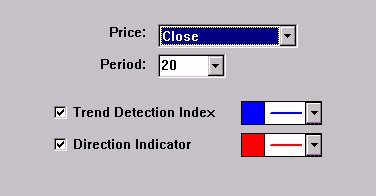
The Trend Detection Index (TDI) was introduced by M. H. Pee. TDI is used to detect when a trend has begun and when it has come to an end. The TDI can be used as a stand-alone indicator or combined with others; it will perform well in detecting the beginning of trends. TDI should be used in conjunction with protective stops as well as trailing stops. These stops are required to protect against large losses when the indicator generates a losing trade. The TDI can trade a diverse portfolio of markets profitably over many years, using the same parameters throughout. To calculate the 20-day trend detection index, first find the value of the momentum indicator. After the market closes, calculate today's 20-day momentum by subtracting the close 20 days ago from that of today. Next, find the 20-day absolute momentum, which is defined as the absolute value of today's 20-day momentum. More details can be found in the formula section above.
The trend detection index will signal a trend if it shows a positive value and a consolidation if it shows a negative value. As a trend-follower, the position should be entered in the direction of the trend when the TDI is positive. To determine the current direction of the trend, the direction indicator can be used, which is defined as the sum of the 20-day momentum of the last 20 days. An uptrend is signaled by a positive direction indicator value, whereas a downtrend is signaled by a negative value. Basically, it comes down to this: Enter long tomorrow at the open if both the TDI and direction indicator are positive after today's close or enter short at the open if the TDI is positive and the direction indicator is negative.
Presentation
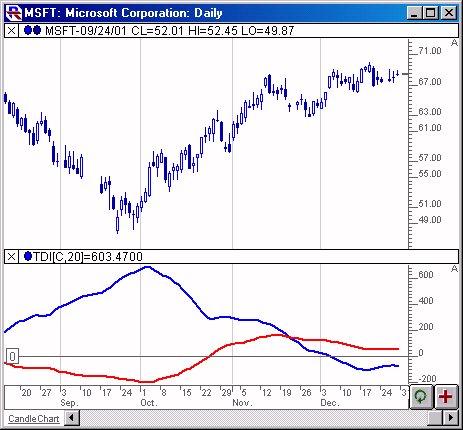
Above is a Daily Chart of Microsoft (MSFT). The Trend Detection Index (TDI) is added to the lower window pane, using the preferences seen below. The blue line represents the Trend Detection Index while the red line represents the Direction Indicator.
Formula
Keyboard Adjustment
You can adjust the TDI period directly from the keyboard without having to open up the TDI preferences window. Just select the TDI indicator in the chart (either by tabbing to the indicator or by clicking on it), and then simply hit the up arrow on they keyboard to increase the period by one, and the down arrow on the keyboard to decrease the period by 1.